Basic Inspection
- Diagnosis and Repair Work Flow
- Additional Service When Replacing Driver Seat Control Unit
- Additional Service When Replacing Passenger Seat Control Unit
- Memory Storing
- System Setting
Diagnosis and Repair Work Flow Nissan Ariya 1st generation
Work Flow
OVERALL SEQUENCE
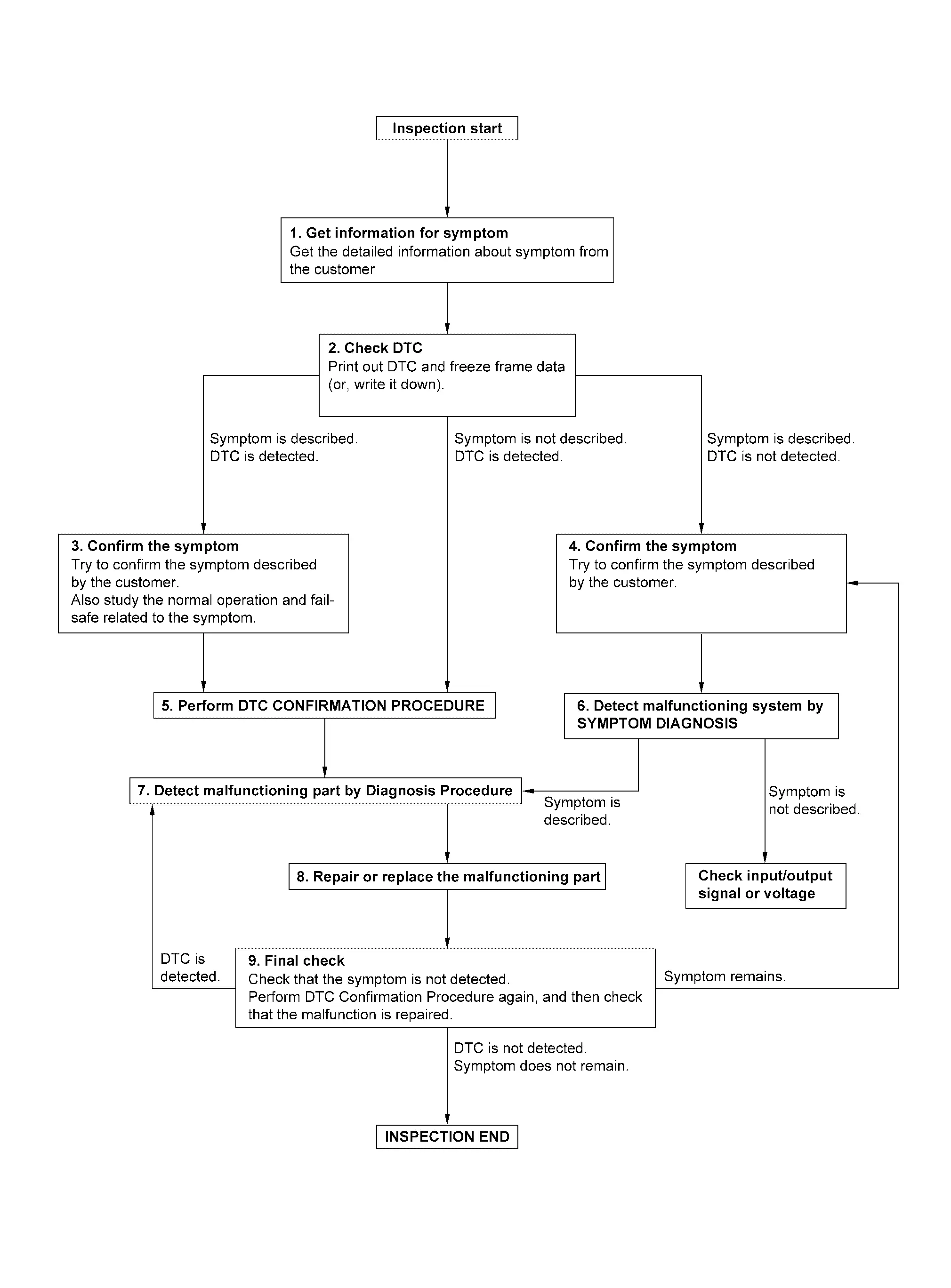
DETAILED FLOW
GET INFORMATION FOR SYMPTOM
Get detailed information from the customer about the symptom (the condition and the environment when the incident/malfunction occurs).
Check operation condition of the function that is malfunctioning.
GO TO 2.
CHECK DTC
Check DTC.
Perform the following procedure if DTC is detected.
Record DTC and freeze frame data (Print them out using CONSULT.)
Erase DTC.
Study the relationship between the cause detected by DTC and the symptom described by the customer.
Are any symptoms described and any DTC detected?
Symptom is described, DTC is detected>>GO TO 3.
Symptom is described, DTC is not detected>>GO TO 4.
Symptom is not described, DTC is detected>>GO TO 5.
CONFIRM THE SYMPTOM
Try to confirm the symptom described by the customer.
Also study the normal operation and fail-safe related to the symptom.
Verify relation between the symptom and the condition when the symptom is detected.
>>GO TO 5.
CONFIRM THE SYMPTOM
Try to confirm the symptom described by the customer.
Verify relation between the symptom and the condition when the symptom is detected.
>>GO TO 6.
PERFORM DTC CONFIRMATION PROCEDURE
Perform DTC CONFIRMATION PROCEDURE for the detected DTC, and then check that DTC is detected again. At this time, always connect CONSULT to the Nissan Ariya vehicle, and check self diagnostic results in real time.
If two or more DTCs are detected, refer to DTC INSPECTION PRIORITY CHART, and determine trouble diagnosis order.
Is DTC detected?
YES>>GO TO 7.
NO>>Refer to Intermittent Incident.
DETECT MALFUNCTIONING SYSTEM BY SYMPTOM DIAGNOSIS
Detect malfunctioning system according to SYMPTOM DIAGNOSIS based on the confirmed symptom in step 4, and determine the trouble diagnosis order based on possible causes and symptom.
Is the symptom described?
YES>>GO TO 7.
NO>>Monitor input data from related sensors or check voltage of related module terminals using CONSULT.
DETECT MALFUNCTIONING PART BY DIAGNOSIS PROCEDURE
Inspect according to Diagnosis Procedure of the system.
Is malfunctioning part detected?
YES>>GO TO 8.
NO>>Refer to Intermittent Incident.
REPAIR OR REPLACE THE MALFUNCTIONING PART
Repair or replace the malfunctioning part.
Reconnect parts or connectors disconnected during Diagnosis Procedure again after repair and replacement.
Check DTC. If DTC is detected, erase it.
GO TO 9.
FINAL CHECK
When DTC is detected in step 2, perform DTC CONFIRMATION PROCEDURE again, and then check that the malfunction is repaired securely.
When symptom is described by the customer, refer to confirmed symptom in step 3 or 4, and check that the symptom is not detected.
Is DTC detected and does symptom remain?
YES-1>>DTC is detected: GO TO 7.
YES-2>>Symptom remains: GO TO 4.
NO>>Before returning the Nissan Ariya vehicle to the customer, always erase DTC.
Additional Service When Replacing Driver Seat Control Unit Nissan Ariya: FE0
Description
Each function is reset to the following condition when the driver seat control unit is replaced. For details, refer to Work Procedure.
| Function | Condition | Procedure |
|---|---|---|
| Memory (seat, steering column, door mirror) | Erased | Perform memory storing |
| Log-in | Erased | Perform log-in storing |
Work Procedure
REPLACE DRIVER SEAT CONTROL UNIT
Replace driver seat control unit. Refer to Removal and Installation.
>>GO TO 2.
Nissan Ariya Vehicle SPECIFICATION RECOGNITION
Connect battery negative terminal.
Power switch ON and wait for 30 seconds or more.
GO TO 3.
LOG-IN STORING
Perform log-in storing. Refer to System Description.
>>GO TO 4.
MEMORY STORING
Perform memory storing. Refer to Description.
>>WORK END
Additional Service When Replacing Passenger Seat Control Unit Nissan Ariya first Gen
Description
Each function is reset to the following condition when the passenger seat control unit is replaced. For details, refer to Work Procedure.
| Function | Condition | Procedure |
|---|---|---|
| Memory (passenger seat) | Erased | Perform memory storing |
Work Procedure
REPLACE PASSENGER SEAT CONTROL UNIT
Replace passenger seat control unit. Refer to Removal and Installation.
>>GO TO 2.
MEMORY STORING
Perform memory storing. Refer to Description.
>>WORK END
Memory Storing Nissan Ariya 2026
Description
Always perform the memory storage when the driver seat control unit is replaced. The memory function will not operate normally if no memory storage is performed. For details, refer to Work Procedure.
Work Procedure
Memory Storage Procedure
Two positions for the seat, steering column, and door mirror can be stored for memory operation by following procedure.
REGISTRATION METHOD
Adjust seat, steering column, and door mirror position manually.
Push set switch.
Push the memory switch (1 or 2) for at least 1 second within 5 seconds after pushing the set switch.
Confirm the operation of each part with memory operation.
END
System Setting Nissan Ariya 2026
Description
The settings of the automatic driving positioner system can be changed, using information display in the combination meter and the set switch. Always check the settings before and after replacing driver seat control unit. For details, refer to Work Procedure.
×: Applicable
| Item | Content | Information display | Set switch | Factory setting |
|---|---|---|---|---|
| Entry/exit assist (driver seat) | Entry/exit assist (driver seat) can be selected: ON (operated) – OFF (not operated) |
× | × | ON |
| Entry/exit assist (steering column) | Entry/exit assist (steering column) can be selected: ON (operated) – OFF (not operated) |
Work Procedure
CHOOSE METHOD
There are two ways of setting method.
Which method do you choose?
With information display>>GO TO 2.
With set switch>>GO TO 3.
WITH INFORMATION DISPLAY
Power switch ON.
Select "Exit Seat Slide" in "Driving Position" of “Nissan Ariya Vehicle settings” of "Settings" using information display to change between ON and OFF.
Select "Exit Seat Slide" or "Exit Steering Up" to change between ON and OFF.
GO TO 4.
WITH SET SWITCH
Power switch OFF.
Push setting button and hold for more than 10 seconds.
GO TO 4.
CONFIRM THE OPERATION
Check the entry/exit assist function setting is changed.
Is the setting changed?
YES>>END
NO>>GO TO 1.