System (intelligent Key System)
- Intelligent Key System
- Door Lock Function
- Approach Unlock/walk Away Lock Function
- Back Door Open Function
- Remote Keyless Entry Function
- Key Reminder Function
- Sleep Mode Function
- Power Consumption Control System
- Information Display (combination Meter)
- Warning/indicator/chime List
Intelligent Key System Nissan Ariya: FE0
System Description
SYSTEM DIAGRAM

*1: With automatic back door system models
*2: Without automatic back door system models
| Component | Function | |
|---|---|---|
| Outside key antenna | Refer to Outside Key Antenna | |
| Door request switch | Refer to Back Door Opener Switch Assembly. | |
| One touch sensor | Refer to One Touch Sensor | |
| Door switch |
|
|
| Power switch | Push switch | Detect push switch ON/OFF condition. |
| NATS antenna amp. | Refer to Inside Key Antenna | |
| Unlock sensor | Refer to Door Lock Assembly | |
| Back door opener switch | Refer to Back Door Opener Switch Assembly | |
| Back door opener actuator*1 | Refer to Back Door Lock Assembly. | |
| Intelligent Key warning buzzer | Refer to Intelligent Key Warning Buzzer | |
| Door lock actuator |
|
|
| Combination meter | Performs operation method guide and warning with buzzer. | |
| Automatic back door control unit*2 | Refer to Automatic Back Door Control Unit. | |
| BCM |
|
|
| Intelligent Key unit | Intelligent Key unit detects the Nissan Ariya vehicle status according to signals from each outside antenna/NATS antenna amp. | |
| Intelligent Key | Operates based on the results of electronic ID verification using two-way communication between the Intelligent Key and the Nissan Ariya vehicle (Intelligent Key unit) | |
| VCM | Transmits READY condition signal and shift position signal to Intelligent Key unit via CAN communication. | |
| IPDM E/R | IPDM E/R operates horns when horn request signal received from BCM. | |
| Horn | Operates when signal is received from IPDM E/R. | |
*1: Without automatic back door system models
*2: With automatic back door system models
SYSTEM DESCRIPTION
The Intelligent Key system is a system that makes it possible to lock and unlock the door locks by carrying the Intelligent Key, which operates based on the results of electronic ID verification using two-way communication between the Intelligent Key and the Nissan Ariya vehicle (Intelligent Key unit).
The settings for each function can be changed with CONSULT and combination meter.
If an Intelligent Key is lost, a new Intelligent Key can be registered. A maximum of 4 Intelligent Keys can be registered.
It is possible to perform a diagnosis on the system and register an Intelligent Key with CONSULT.
| Function | Description |
|---|---|
| Door lock | Lock/unlock can be performed by pressing the door request switch. |
| One touch door lock | Lock/unlock can be performed by touching the one touch sensor. |
| Back door open | The back door can be opened by carrying the Intelligent Key and pressing the back door opener switch. |
| Approach unlock/walk away lock | The door can be unlocked when approaching the Nissan Ariya vehicle and the door can be locked when away from the vehicle. |
| Remote keyless entry | Lock/unlock can be performed by pressing the remote controller button of the Intelligent Key. |
| Key reminder | The Intelligent Key warning buzzer sounds a warning if the door is locked with the key left inside the Nissan Ariya vehicle. |
| Warning (information display) | If an action that does not meet the operating condition of the Intelligent Key system is taken, the information display displays to inform the driver. |
| Warning (buzzer) | If an action that does not meet the operating condition of the Intelligent Key system is taken, the buzzer sounds to inform the driver. |
| READY set | The Nissan Ariya vehicle can be set READY while carrying the Intelligent Key Refer to System Description. |
| Signature light | Parking, license plate and tail lamps are controlled according to door lock/unlock. Refer to System Description |
| Automatic drive positioner | Setting of auto driving position can be automatically set, according to key ID of Intelligent Key, to the setting value that is registered in advance. Refer to System Description |
| Auto retractable door mirror | Door mirror operates by operation of Intelligent Key, door request switch and one touch sensor. Refer to System Description |
Circuit Diagram
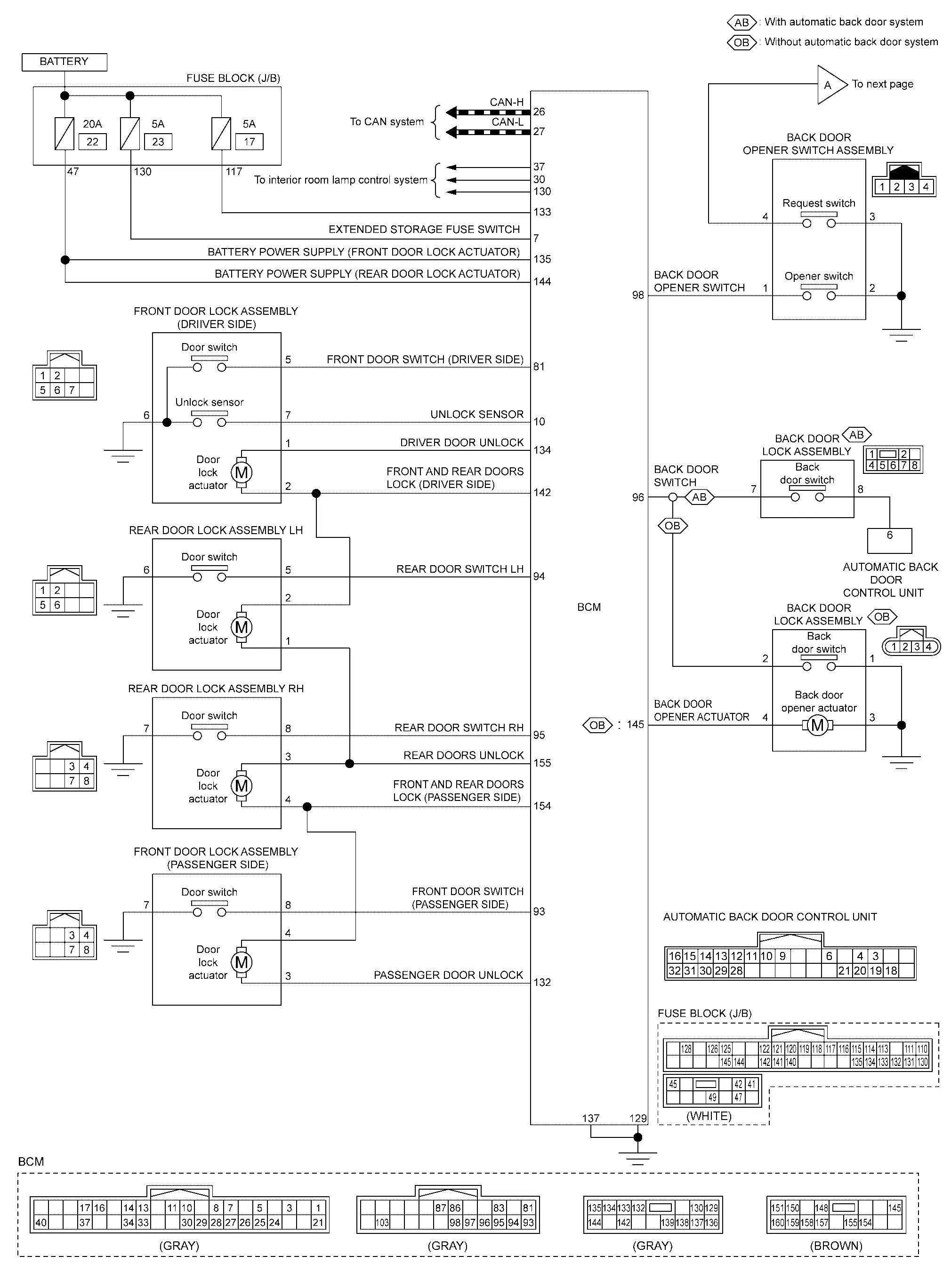
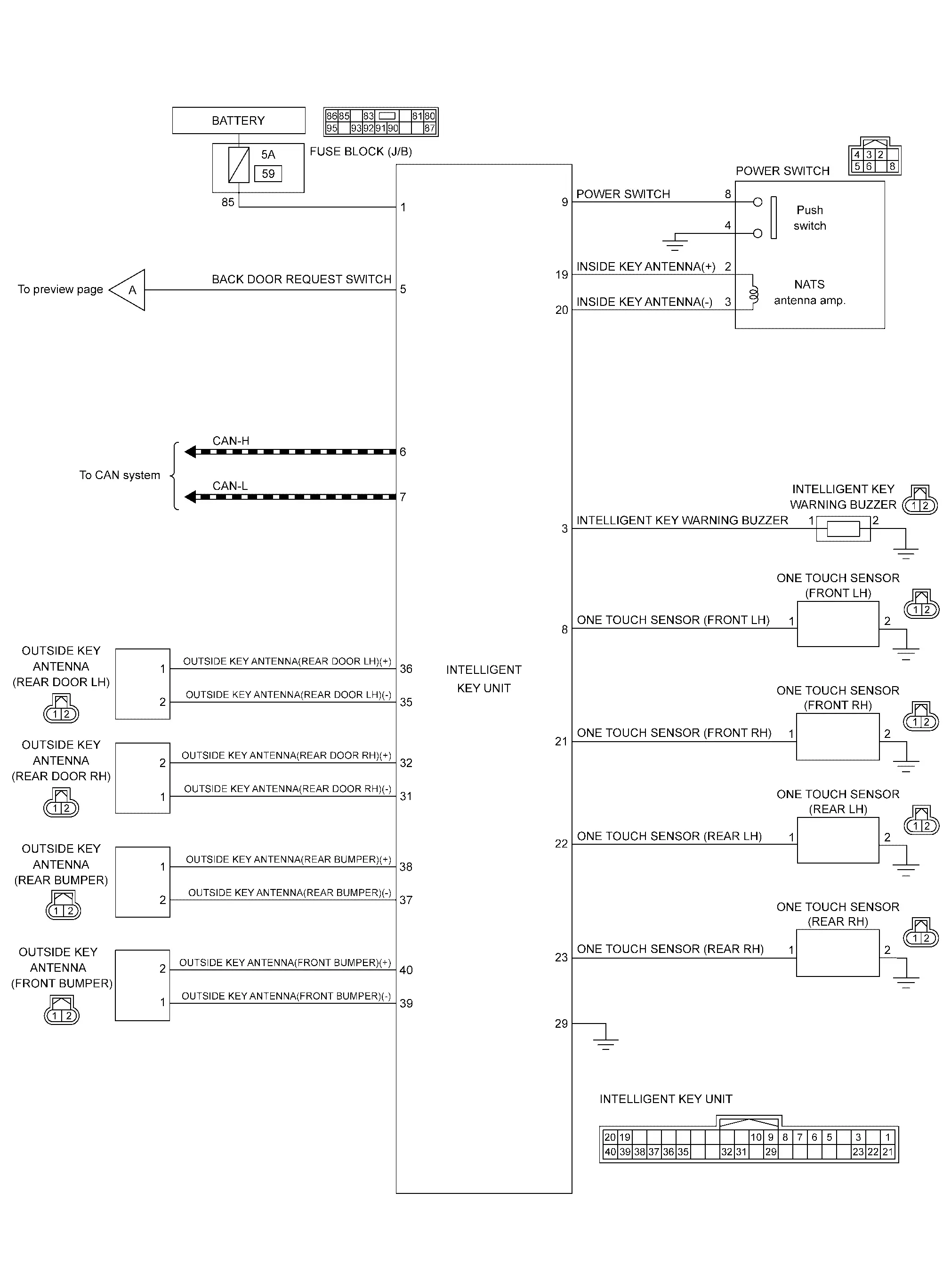
Fail-safe
| Display contents of CONSULT | Fail-safe |
|---|---|
| B2042-4A: Electric shift authentication fail | Prohibit shifting the shift selector from P position |
| B2043-4A: Electric shift ID discord | |
| B2044-4A: Electric shift ID registration fail | |
| B2045-4A: Electric shift ID discord | |
| B2047-87: Electric shift communication fail |
Door Lock Function Nissan Ariya first Gen
System Description
SYSTEM DIAGRAM
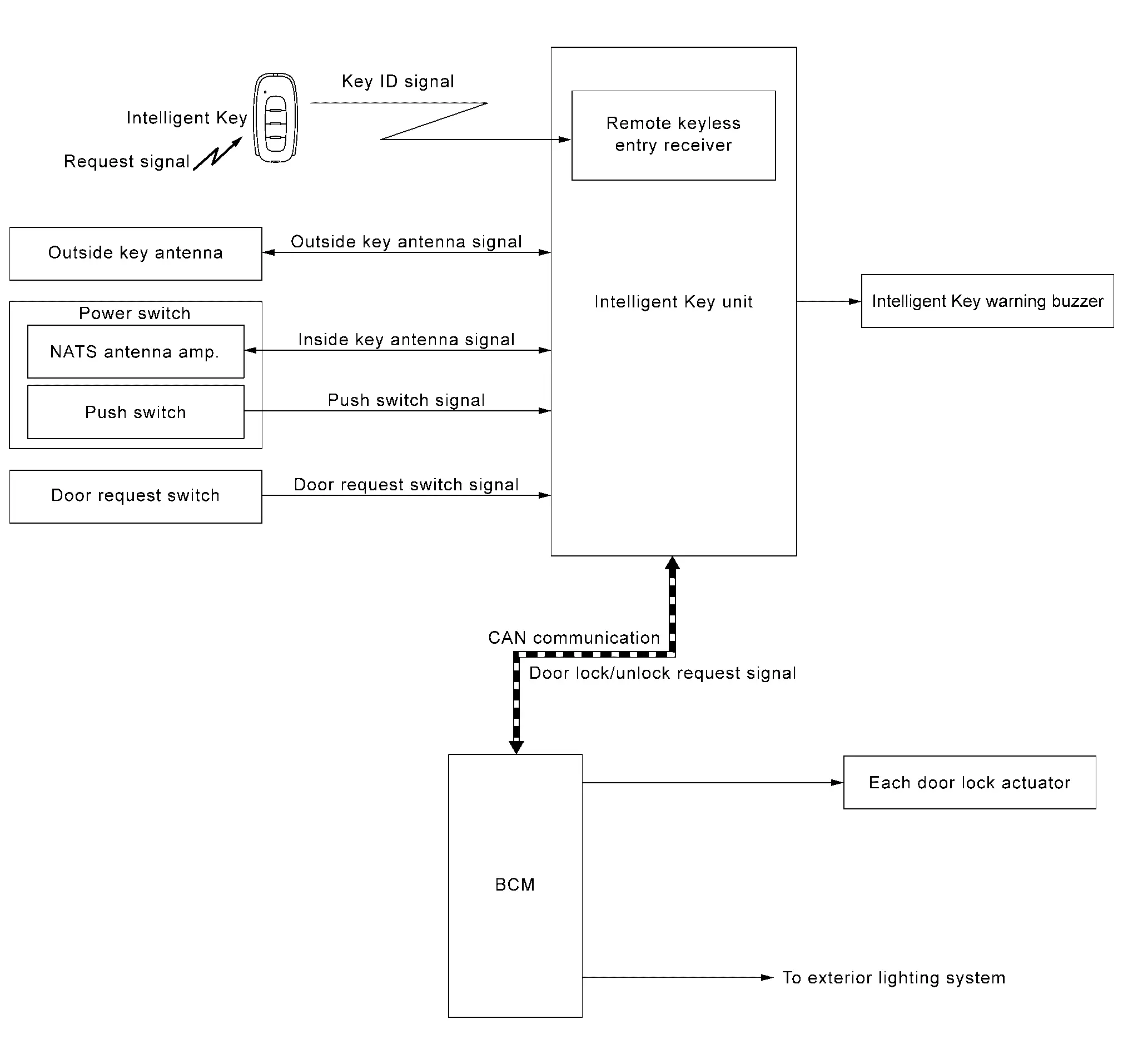
Door lock function controls operation function of the following items.
Door lock and unlock function (door request switch)
Selective unlock function (door request switch)
Reminder function (door request switch)
Auto door lock function (door request switch)
DOOR LOCK AND UNLOCK FUNCTION (DOOR REQUEST SWITCH)
When pressing the door request switch, it is possible to lock and unlock the door by carrying the Intelligent Key.
Operation Description
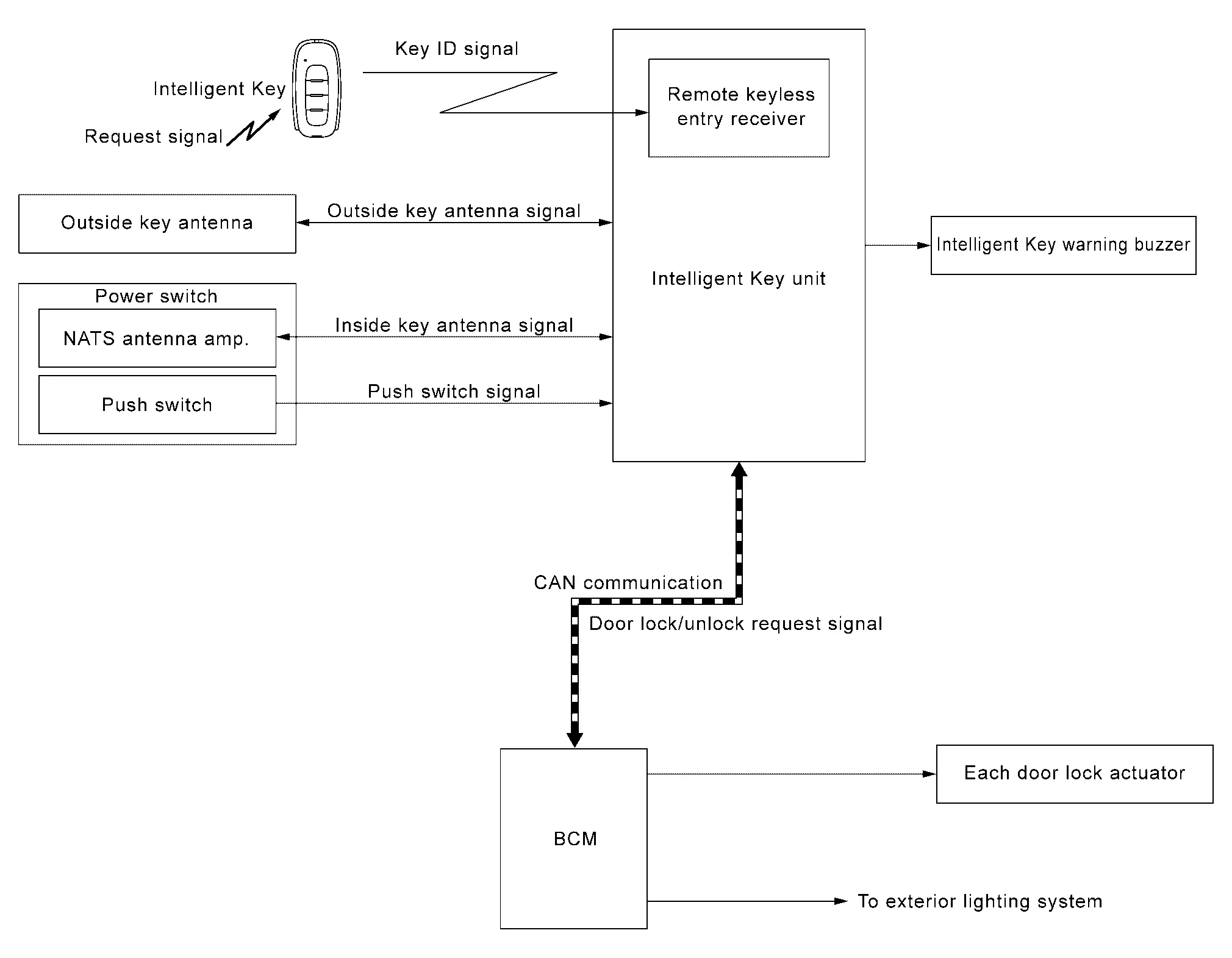
When the Intelligent Key unit detects that door request switch is pressed, it starts the outside key antenna and inside key antenna corresponding to the pressed door request switch and transmits the request signal to the Intelligent Key. And then, check that the Intelligent Key is near the door.
If the Intelligent Key is within the outside key antenna detection area, it receives the request signal and transmits the key ID signal to the Intelligent Key unit.
Intelligent Key unit receives the key ID signal and compares it with the registered key ID to the Nissan Ariya vehicle.
If the verification result is OK, Intelligent Key unit transmits the door lock/unlock request signal to BCM via CAN communication.
BCM transmits door lock/unlock signal to each door lock actuator, activates each door lock actuator when receiving door lock/unlock request signal from Intelligent Key unit.
Operation Condition
If the following conditions are satisfied, door lock and unlock operation is performed if the door request switch is operated.
| Door request switch operation | Operation condition |
|---|---|
| Lock |
|
| Unlock |
|
SELECTIVE UNLOCK FUNCTION (DOOR REQUEST SWITCH)
Lock Operation
When an LOCK signal is sent from back door request switch , all doors are locked.
Unlock Operation
When an UNLOCK signal from back door request switch is transmitted, back door unlocks. When back door request switch is operated again within 60 seconds, all door unlocks.
SELECTIVE UNLOCK FUNCTION SETTING
The selective unlock function setting can be changed in "Vehicle Settings" of combination meter.
REMINDER FUNCTION (DOOR REQUEST SWITCH)
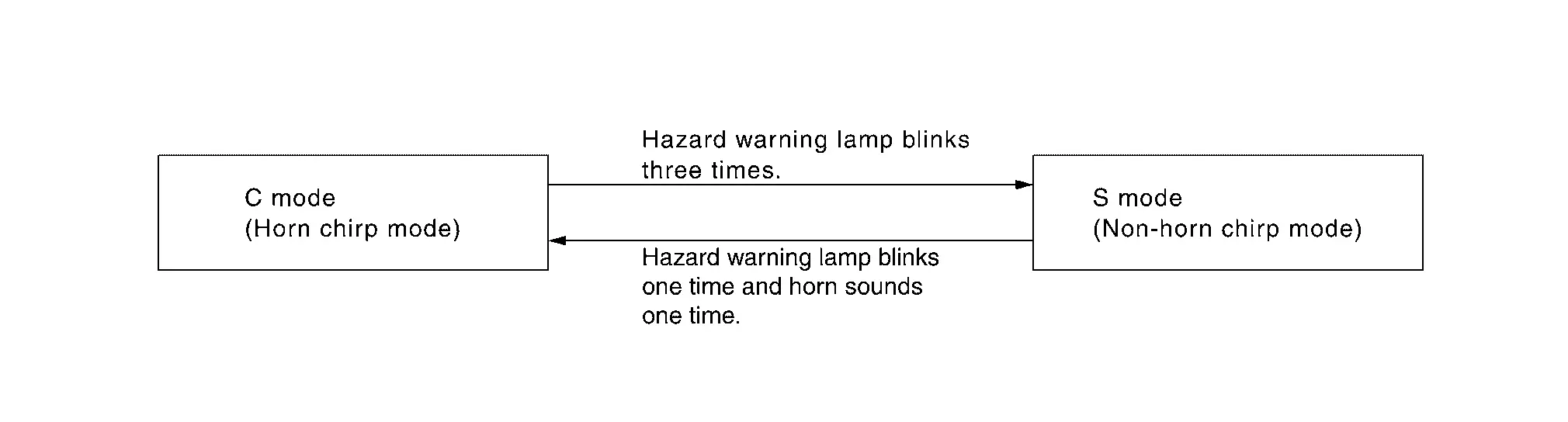
When doors are locked or unlocked by door request switch, BCM blinks hazard warning lamps as a reminder or Intelligent Key warning buzzer signal to Intelligent Key unit via CAN communication. Reminder function does not operate if power switch in READY position. The reminder function has C mode and S mode.
| Operation | C mode | S mode | ||
|---|---|---|---|---|
| Door request switch | Lock | Unlock | Lock | Unlock |
| Hazard warning lamp | Twice | Once | Twice | – |
| Intelligent Key warning buzzer | Twice* | Once* | – | – |
*: Work support mode [Intelligent Key system answer back function setting] setting is "On"
How to Change Reminder Function Operation Mode
Reminder function operation mode can be changed using combination meter setting.
When lock and unlock signal are sent from the Intelligent Key for more than 4 seconds at the same time, the hazard and buzzer reminder mode is changed and hazard warning lamp blinks and horn sounds as per the following items.
AUTO DOOR LOCK FUNCTION (DOOR REQUEST SWITCH)
After door is unlocked by door request switch operation and if 30 seconds or more passes without performing the following operation, all doors are automatically locked. However, reminder function does not activate.
| Operating condition |
|
OUTSIDE KEY ANTENNA DETECTION AREA
The outside key antenna detection area of door lock/unlock function is in the range of approximately 0.8 m (31.50 in) surrounding the back door request switch  . However, this operating range depends on the ambient conditions.

LIST OF OPERATION RELATED PARTS
Parts marked with × are the parts related to operation.
| Function | Intelligent Key | Intelligent Key unit | Door switch | Door request switch | Door lock actuator | Outside key antenna | CAN communication system | BCM | Hazard warning lamp | Power switch | Combination meter |
|---|---|---|---|---|---|---|---|---|---|---|---|
| Door lock and unlock function (door request switch) | × | × | × | × | × | × | × | × | × | ||
| Selective unlock function (door request switch) | × | × | × | × | × | × | × | × | |||
| Reminder function (door request switch) | × | × | × | × | × | ||||||
| Auto door lock function (door request switch) | × | × | × | × | × | × |
Approach Unlock/walk Away Lock Function Nissan Ariya 1st generation
System Description
SYSTEM DIAGRAM
APPROACH UNLOCK/WALK AWAY LOCK FUNCTION
Approach unlock/walk away lock function controls following operation function items.
Door lock and unlock function
Reminder function
Auto door lock function
DOOR LOCK AND UNLOCK FUNCTION
With the carrying the Intelligent Key, the door can be unlocked when approaching the vehicle and the door can be locked when away from the Nissan Ariya vehicle.
OPERATION DESCRIPTION (APPROACH UNLOCK)
The Intelligent Key unit transmits the key ID signal if the Intelligent Key enters the approach unlock operating range.
The Intelligent Key unit receives the key ID signal and collate it with the registered key ID in the Nissan Ariya vehicle.
When the key ID match, the Intelligent Key unit transmits the door lock/unlock request signal to the BCM.
When the BCM receives door lock/unlock request signal from the Intelligent Key unit, all doors are unlocked.
OPERATION DESCRIPTION (WALK AWAY LOCK)
When the Intelligent Key unit detects that the Intelligent Key has been taken out of the walk away lock operating range when getting off, transmits the key ID signal to the Intelligent Key unit.
The Intelligent Key unit receives the key ID signal and collates it with the registered key ID in the Nissan Ariya vehicle.
When the key ID match, the Intelligent Key unit transmits the door lock/unlock request signal to the BCM.
When the BCM receives door lock/unlock request signal from the Intelligent Key unit, all doors are locked.
OPERATION CONDITION
Approach unlock/walk away lock will operates when all of the following operating conditions are satisfied.
| Approach unlock/walk away lock | Operation condition |
|---|---|
| Lock |
|
| Unlock |
|
APPROACH UNLOCK OPERATING RANGE
Operating range of approach unlock function is approximately 1 m (39.37 in) around the vehicle . However this operating range may change depending on the surrounding conditions.
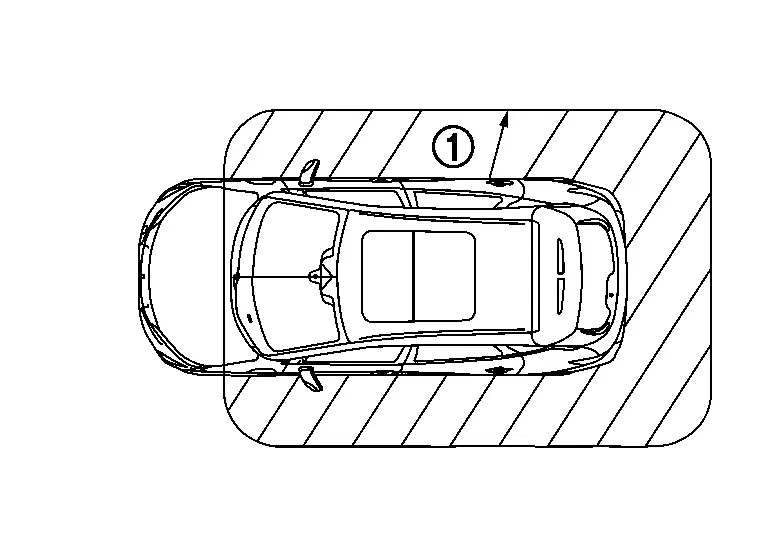
WALK AWAY LOCK OPERATING RANGE
Operating range of walk away lock function is approximately 2 m (78.74 in) around the vehicle . However this operating range may change depending on the surrounding conditions.

REMINDER FUNCTION
When doors are locked or unlocked by approach unlock/walk away lock function, BCM blinks hazard warning lamps as a reminder.
| Operation | Hazard warning lamp | Intelligent Key warning buzzer |
|---|---|---|
| Lock | Twice | Twice |
| Unlock | Once | Once* |
*: Work support mode [Intelligent Key system answer back function setting] setting is ON.
AUTO DOOR LOCK FUNCTION
When the following operations are not performed within approximately 30 seconds after door is unlocked by approach unlock, the Intelligent Key unit locks all doors. However, the reminder function does not activate.
| Operating condition |
|
LIST OF OPERATION RELATED PARTS
Parts marked with × are the parts related to operation.
| Approach unlock/walk away lock | Intelligent Key | Door switch | Door lock actuator | Outside key antenna | CAN communication system | BCM | Power switch | Hazard warning lamp | Intelligent Key unit | Combination meter | Intelligent Key warning buzzer |
|---|---|---|---|---|---|---|---|---|---|---|---|
| Door lock and unlock function | × | × | × | × | × | × | × | × | |||
| Reminder function | × | × | × | × | × | × | |||||
| Auto door lock function | × | × | × | × | × | × |
Back Door Open Function Nissan Ariya 2026
System Description
SYSTEM DIAGRAM
*1: With automatic back door system models
*2: Without automatic back door system models
BACK DOOR OPEN FUNCTION
This section describes the operation of the back door opener switch.
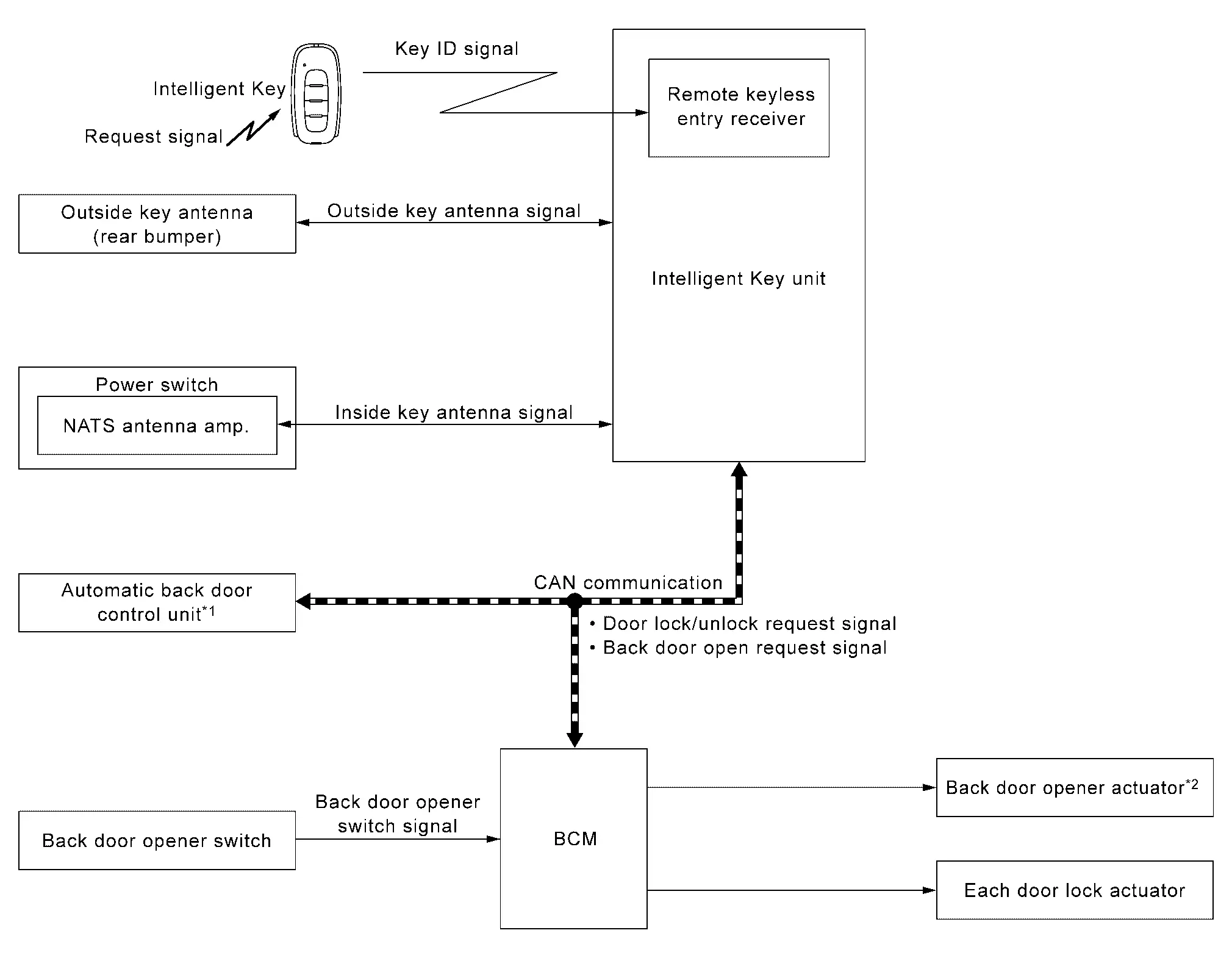
The back door open function can open the back door by pressing the back door opener switch while carrying the Intelligent Key and all doors are locked.
The back door open function enables the back door to be opened by pressing back door opener switch after BCM transmits UNLOCK signal to each door. Refer to System Description.
OPERATION DESCRIPTION (WITHOUT AUTOMATIC BACK DOOR SYSTEM MODELS)
When the BCM detects that back door opener switch is pressed, then Intelligent Key unit transmits the request signal to the Intelligent Key. And then, check that the Intelligent Key is near the back door.
If the Intelligent Key is within the outside key antenna detection area, it receives the request signal and transmits the key ID signal to the Intelligent Key unit.
Intelligent Key unit receives the key ID signal and compares it with the registered key ID to the Nissan Ariya vehicle.
If the verification result is OK, BCM unlock and opens back door.
OPERATION DESCRIPTION (WITH AUTOMATIC BACK DOOR SYSTEM MODELS)
When the BCM detects that back door opener switch is pressed, then Intelligent Key unit transmits the request signal to the Intelligent Key. And then, check that the Intelligent Key is near the back door.
If the Intelligent Key is within the outside key antenna detection area, it receives the request signal and transmits the key ID signal to the Intelligent Key unit.
Intelligent Key unit receives the key ID signal and compares it with the registered key ID.
If the verification result is OK, Intelligent Key unit transmits the back door open request signal to automatic back door control unit via CAN communication.
Automatic back door control unit transmits back door open request signal to back door lock assembly and back door is open.
When the back door is open, automatic back door system performs waiting operation for next back door close operation.
The operation of then back door open is the same as the automatic back door system, refer to System Description.
OPERATION CONDITION
If the following conditions are satisfied, the back door can be opened.
| Back door opener switch operation | Operation condition |
|---|---|
| Open |
|
OUTSIDE KEY ANTENNA DETECTION AREA
The outside key antenna detection area of back door open function is in the range of approximately 0.8 m (31.50 in) surrounding back door opener switch . However, this operating range depends on the ambient conditions.
LIST OF OPERATION RELATED PARTS
Parts marked with × are the parts related to operation.
| Function | Intelligent Key | Back door switch | Power awitch | Outside key antenna (rear bumper) | CAN communication system | BCM | Intelligent Key unit | Back door opener switch | Automatic back door control unit |
|---|---|---|---|---|---|---|---|---|---|
| Back door open function (back door opener switch) | × | × | × | × | × | × | × | × | × |
Remote Keyless Entry Function Nissan Ariya
System Description
SYSTEM DIAGRAM
Remote keyless entry function controls operation function of the following items.
Door lock and unlock function (Intelligent Key)
Selective unlock function (Intelligent Key)
Reminder function (Intelligent Key)
Auto door lock function (Intelligent Key)
Automatic back door open/close function
Panic alarm
DOOR LOCK AND UNLOCK FUNCTION (INTELLIGENT KEY)
Operation Description
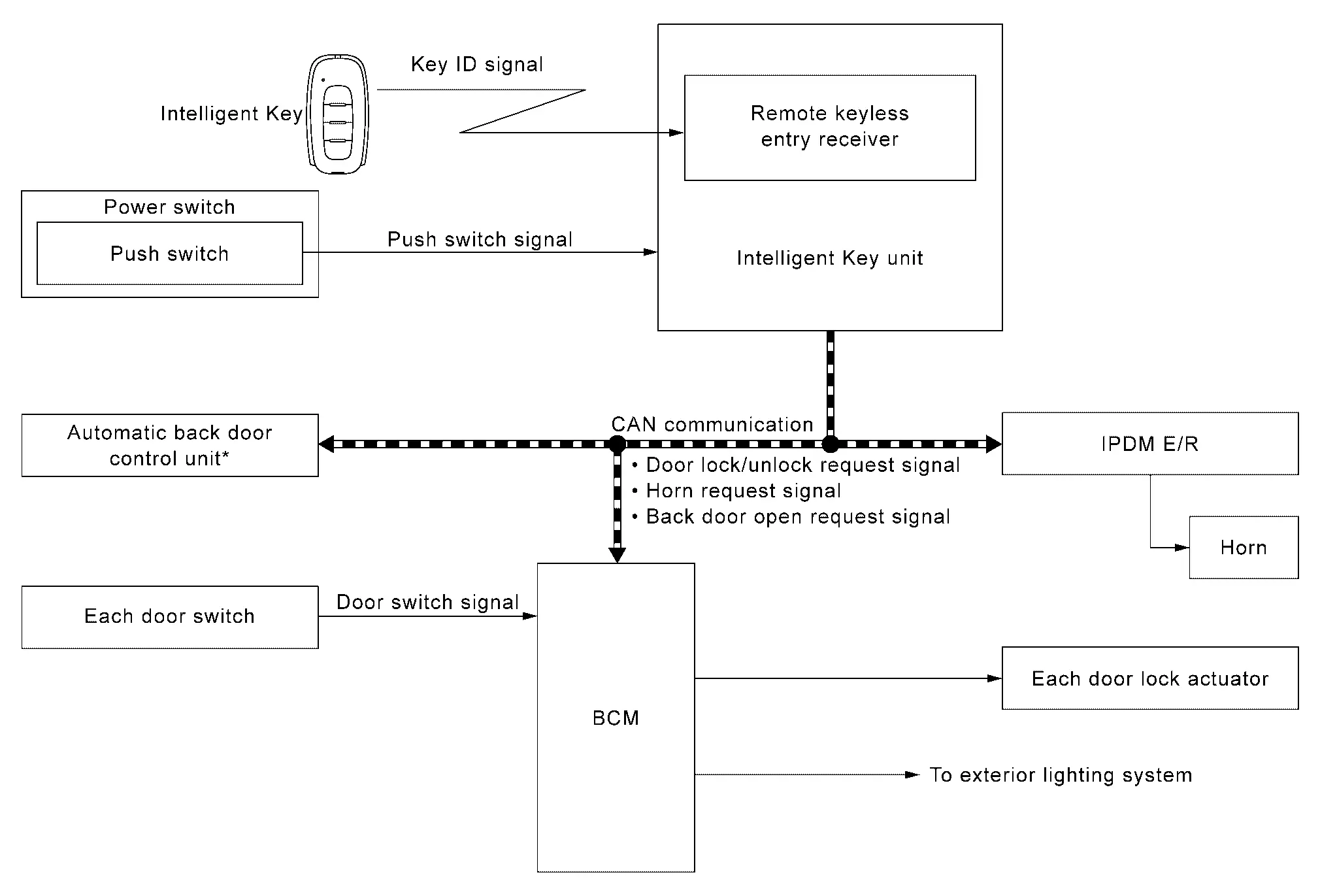
When door lock/unlock button of the Intelligent Key is pressed, lock signal or unlock signal is transmitted from Intelligent Key to Intelligent Key unit.
Intelligent Key unit receives the signal and compares it with the registered key ID to the Nissan Ariya vehicle.
If the verification result is OK, Intelligent Key unit transmits the door lock/unlock request signal to BCM via CAN communication.
BCM transmits door lock/unlock signal to each door lock actuator, activates each door lock actuator.
Operation Condition
If the following condition is satisfied, door lock and unlock operation is performed if the Intelligent Key button is pressed.
| Intelligent Key button operation | Operation condition |
|---|---|
| Lock | Shift P warning is not activated |
SELECTIVE UNLOCK FUNCTION (INTELLIGENT KEY)
Lock Operation
When LOCK signal is transmitted from Intelligent Key, all doors are locked.
Unlock Operation
When an UNLOCK signal is transmitted from Intelligent Key once, driver door is unlocked.
Then, if an UNLOCK signal is transmitted from Intelligent Key again with in 60 seconds, all other doors are unlocked.
SELECTIVE UNLOCK FUNCTION SETTING
The selective unlock function setting can be changed in "Vehicle Settings" of combination meter.
REMINDER FUNCTION (INTELLIGENT KEY)
Operation Description
When doors are locked or unlocked by Intelligent Key button operation, BCM blinks hazard warning lamps as a reminder and transmits horn request signal to IPDM E/R via CAN communication. Reminder function does not operate if power switch in READY position. The reminder function has C mode and S mode.
| Operation | C mode | S mode | ||
|---|---|---|---|---|
| Intelligent Key Operation | Lock | Unlock | Lock | Unlock |
| Hazard warning lamp blinks | Twice | One | Twice | – |
| Horn sound | One* | – | – | – |
*: Work support mode [Intelligent Key system answer back function setting] setting is "On"
How to Change Reminder Function Operation Mode
Reminder function operation mode can be changed using combination meter setting.
When lock and unlock signal are sent from the Intelligent Key for more than 4 seconds at the same time, the hazard and buzzer reminder mode is changed and hazard warning lamp blinks and horn sounds as per the following items:
AUTO DOOR LOCK FUNCTION (INTELLIGENT KEY)
After door is unlocked by Intelligent Key button operation and if 30 seconds or more passes without performing the following operation, all doors are automatically locked. However, reminder function does not activate.
| Operating condition |
|
OPERATION AREA
To check that the Intelligent Key works normally, use within 1 m (39.37 in) range of each door, however the operable range may differ according to surroundings.
AUTOMATIC BACK DOOR OPEN/CLOSE FUNCTION
When back door open button is pressed, back door open automatically for detailed description. Refer to System Description
PANIC ALARM
When Intelligent Key panic alarm button is pressed, horn sounds and head lamp blinks. Refer to System Description.
LIST OF OPERATION RELATED PARTS
Parts marked with × are the parts related to operation.
| Function | Intelligent Key | Intelligent Key unit | Door switch | Door lock actuator | Power switch | CAN communication system | BCM | Combination meter | Hazard warning lamp | IPDM E/R | Horn |
|---|---|---|---|---|---|---|---|---|---|---|---|
| Door lock and unlock function (Intelligent Key) | × | × | × | × | × | ||||||
| Selective unlock function (Intelligent Key) | × | × | × | × | × | ||||||
| Reminder function (Intelligent Key) | × | × | × | × | × | × | × | × | |||
| Auto door lock function (Intelligent Key) | × | × | × | × | × | × |
Key Reminder Function Nissan Ariya first Gen
System Description
SYSTEM DIAGRAM

BASIC OPERATION
Key reminder is the function that prevents the key from being left in the vehicle.
Key reminder has the following 2 functions.
| Key remainder function | Operation condition | Operation |
|---|---|---|
| Driver door closed* | When all doors other than driver door are locked, driver door locks within 0.3 seconds after driver door is closed |
|
| Door is open to closed | When all of the following conditions are satisfied
|
|
*:If the door closing impact shocks the door lock knob, or contacts against baggage with the door lock knob might activate the door locks accidentally but unlock operation is perform in these cases.
Sleep Mode Function Nissan Ariya first Gen
System Description
SLEEP MODE
When operating Intelligent Key button, the function of Intelligent Key is temporarily stopped.
OPERATION DESCRIPTION
When pressing the UNLOCK button twice while pressing the LOCK button of the Intelligent Key, the LED of the Intelligent Key will light for approximately 1 second.
When pressing the LOCK button of the Intelligent Key once while the LED is lit, the LED will blink twice quickly and go into sleep mode.
CANCEL CONDITION
Press either button of Intelligent Key.
REMINDER FUNCTION
LED of Intelligent key blinks twice quickly.
Power Consumption Control System Nissan Ariya 2026
System Description
SYSTEM DIAGRAM
Description
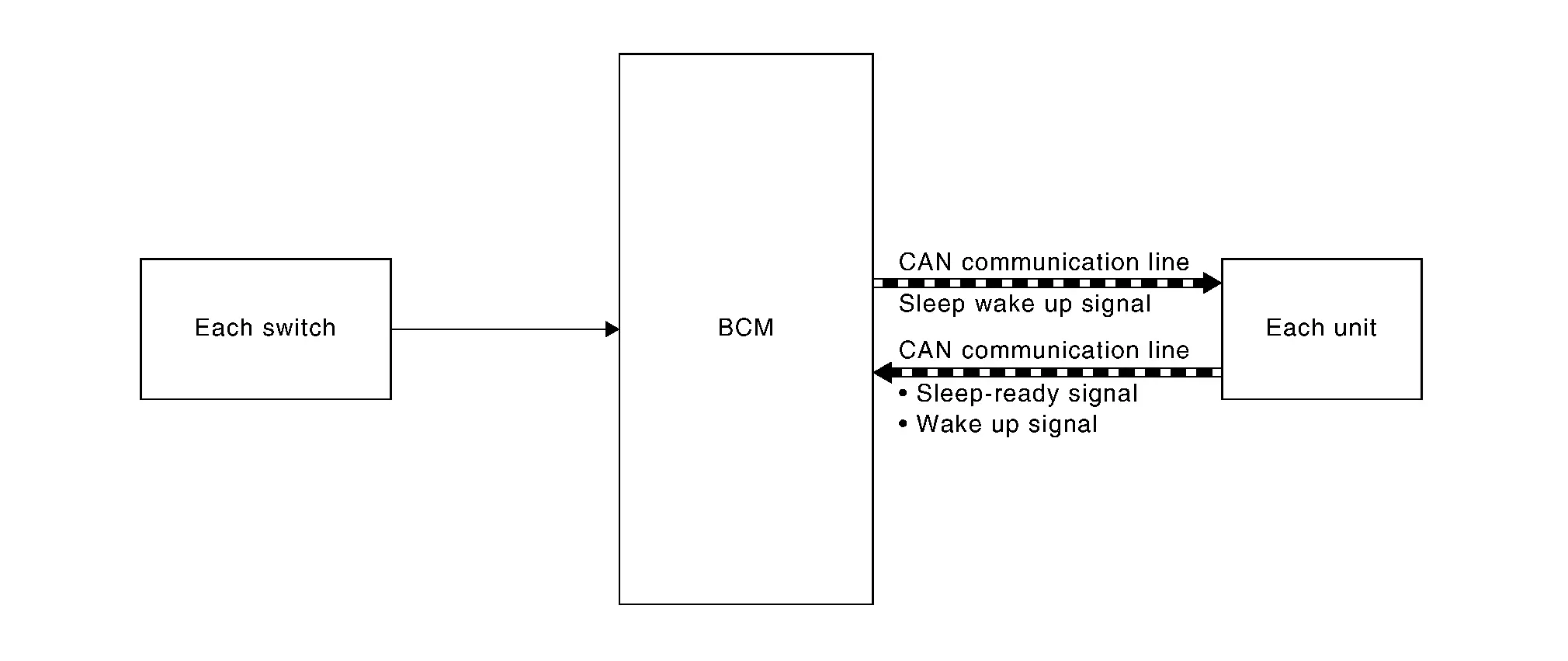
Intelligent Key unit incorporates a power consumption control function that reduces the power consumption according to the Nissan Ariya vehicle status.
Intelligent Key unit changes its status (control mode) with the sleep wake up signal received from BCM via CAN communication.
Normal mode (wake-up)
CAN communication is normally performed with other control units.
Individual unit control by Intelligent Key unit is normally performed.
Low power consumption mode (sleep)
Low power consumption control is active.
CAN transmission is stopped.
Sleep Mode Activation
Intelligent Key unit judges that the sleep-ready conditions are fulfilled when the power switch is OFF and none of the conditions below are present. Then it transmits a sleep-ready signal (ready) to BCM via CAN communication.
Outputting signals to actuators.
Output requests are being received from control units via CAN communication.
Intelligent Key unit stops CAN communication and enters the low power consumption mode when it receives a sleep wake up signal (sleep) from BCM and the sleep-ready conditions are fulfilled.
Wake-Up Operation
Intelligent Key unit changes from the low power consumption mode to the normal mode when it receives a sleep wake-up signal (wake up) from BCM or any of the following conditions is fulfilled. In addition, it transmits a sleep-ready signal (not-ready) to BCM via CAN communication to report the CAN communication start.
Power switch ON.
Power switch status changes.
Door request switch status changes.
Each one touch sensor status changes.
An output request is received from a control unit via CAN communication.
Information Display (combination Meter) Nissan Ariya first Gen
Door Open Warning
DESIGN/PURPOSE
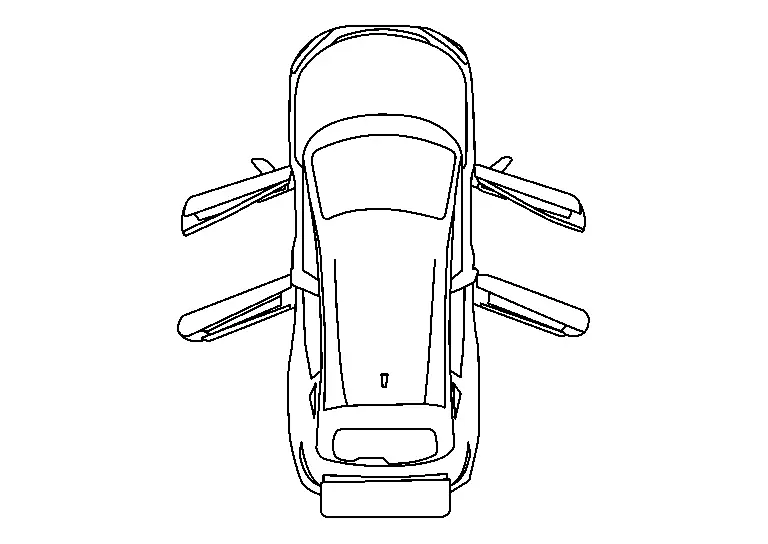
Information display warns the driver that each door is open or is not fully closed.
| Symbol | Message |
|---|---|
 |
– |
SYNCHRONIZATION WITH MASTER WARNING LAMP
Synchronization is applied.
Refer to Master Warning Lamp.
SYSTEM DIAGRAM
SIGNAL PATH
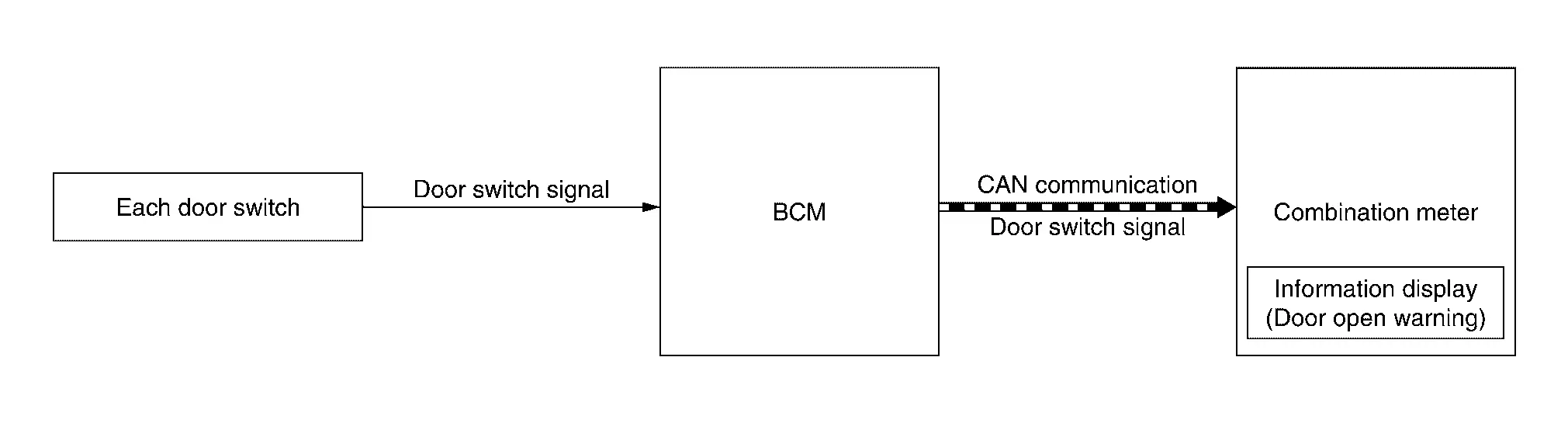
BCM transmits door switch signal to combination meter via CAN communication.
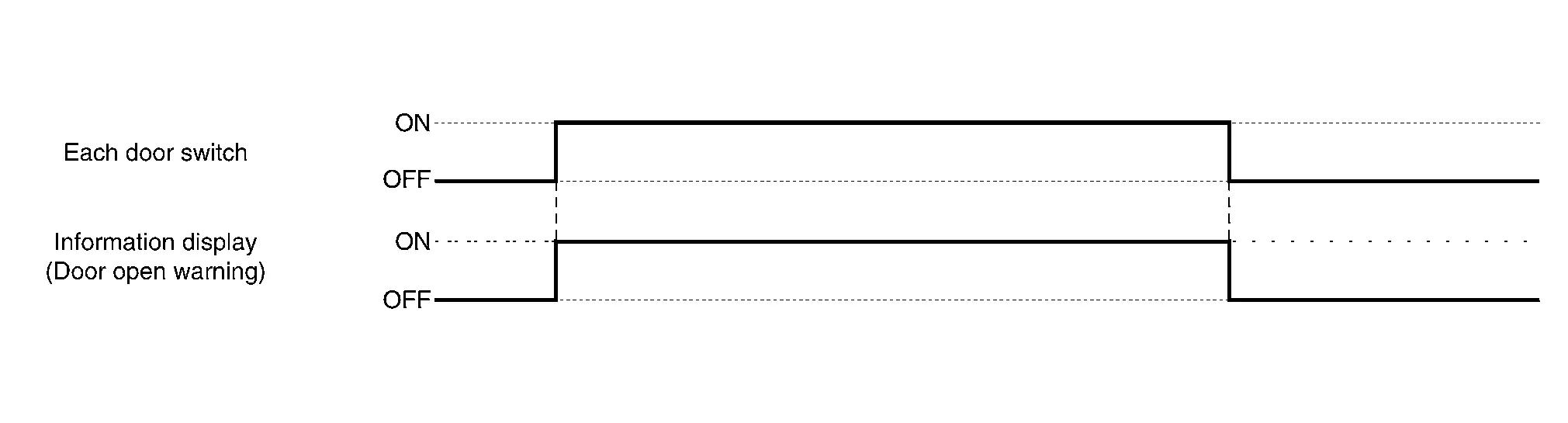
When combination meter judges according to received door switch signal that a door is open or not fully closed, door open warning displays.
Each door switch is ON
All door switches are OFF
TIMING CHART
READY Set Information
DESIGN/PURPOSE
Information display informs the driver that the can be set READY.
| Symbol | Message |
|---|---|
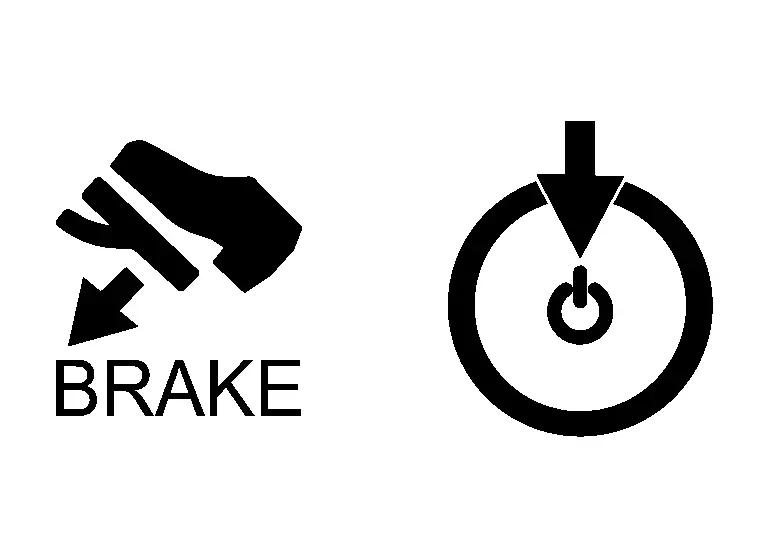 |
Push Brake and Start Button to Drive |
SYNCHRONIZATION WITH MASTER WARNING LAMP
No applicable
SYSTEM DIAGRAM

SIGNAL PATH
Intelligent Key unit receives shift position signal and READY condition signal from VCM via CAN communication and checks that the Nissan Ariya vehicle can set READY.
When Intelligent Key unit detects that the vehicle can set READY, meter display signal is transmitted by Intelligent Key unit to combination meter via CAN communication.
When combination meter receives meter display signal, READY set information displays.
Power Switch is ON.
When all of the following conditions are satisfied.
Power switch is ON.
Shift position: P position.
Vehicle can be set to READY.
When Power Switch is Other Than ON.
When all of the following conditions are satisfied.
One condition of A
All conditions of B
A condition B condition Any door is open → All door is closed
Power switch: Pressed
Intelligent Key backside is contacted to power switch while brake pedal is depressed.
Power switch: OFF
Shift position: P position
Registered Intelligent Key is detected inside Nissan Ariya vehicle.
When Power Switch is ON.
When any of the following conditions are satisfied.
Vehicle is in READY condition.
Shift position: Other than P position.
When Power Switch is Other than ON.
When any of the following conditions are satisfied.
Shift position: Other than P position.
Registered Intelligent Key is not detected inside the Nissan Ariya vehicle.
When Intelligent Key unit receives Intelligent Key button operation.
When Intelligent Key unit receives door request switch signal from door request switch.
When Intelligent Key unit receives one touch sensor signal from one touch sensor.
After 15 seconds are passed since the READY set information is displayed.
Intelligent Key Low Battery Warning
DESIGN/PURPOSE
Information display warns the driver that Intelligent Key battery level is low.
| Symbol | Message |
|---|---|
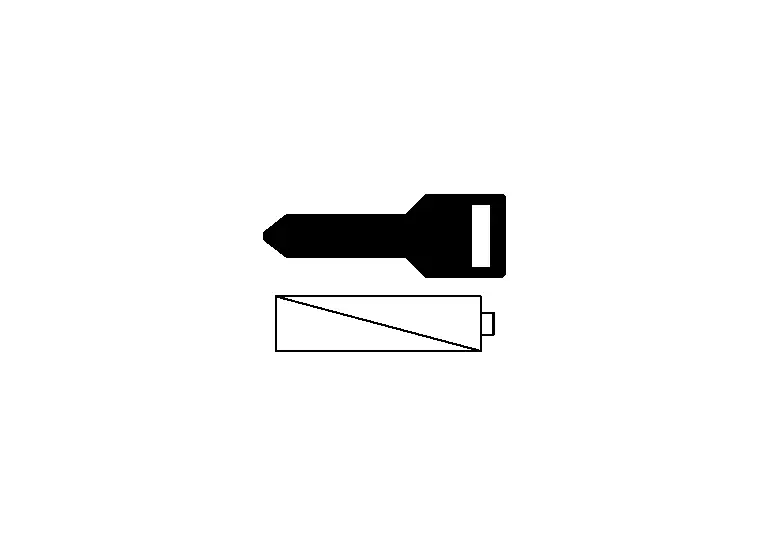 |
Key Battery Low |
SYNCHRONIZATION WITH MASTER WARNING LAMP
No applicable
SYSTEM DIAGRAM
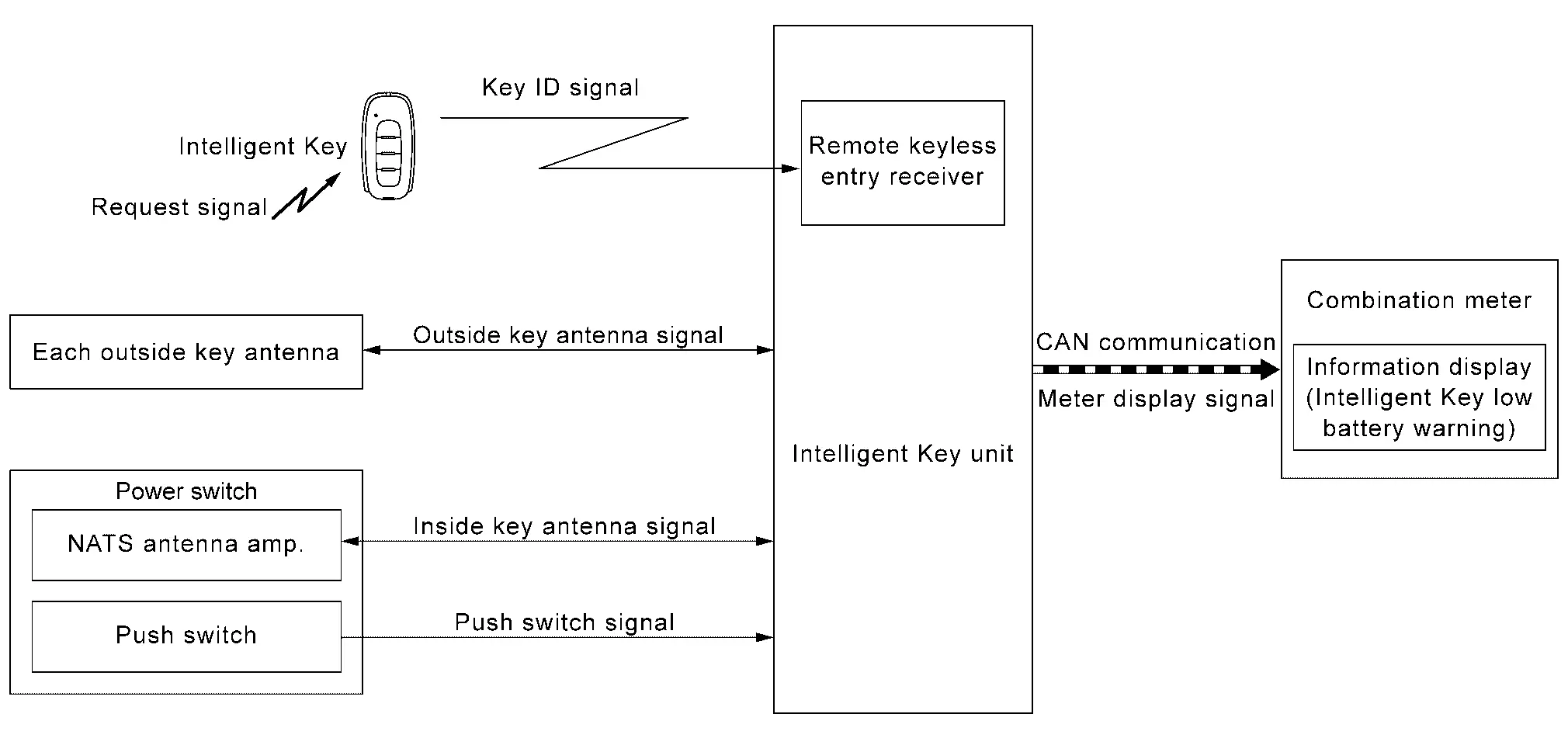
SIGNAL PATH
When Intelligent Key receives request signal from inside key antenna or outside key antenna, transmits key ID signal is transmitted from Intelligent Key to Intelligent Key unit.
Intelligent Key unit receives key ID signal and detects that Intelligent Key battery level is low.
When Intelligent Key unit detects that power switch is ON, meter display signal is transmitted by Intelligent Key unit to combination meter via CAN communication.
When combination meter receives meter display signal, Intelligent Key low battery warning displays.
When all of the following conditions are satisfied.
Power switch is ON.
Intelligent Key battery level is low.
When any of the following conditions are satisfied.
After 30 seconds are passed since the Intelligent Key low battery warning is displayed
Power switch is other than ON.
When Intelligent Key backside is contacted to power switch while brake pedal is depressed.
TIMING CHART

Intelligent Key System Malfunction
DESIGN/PURPOSE
Information display warns the driver that Intelligent Key system malfunctions or that vehicle cannot set READY.
| Symbol | Message |
|---|---|
 |
Key System Error See Owner’s Manual |
SYNCHRONIZATION WITH MASTER WARNING LAMP
Synchronization is applied.
Refer to Master Warning Lamp.
SYSTEM DIAGRAM
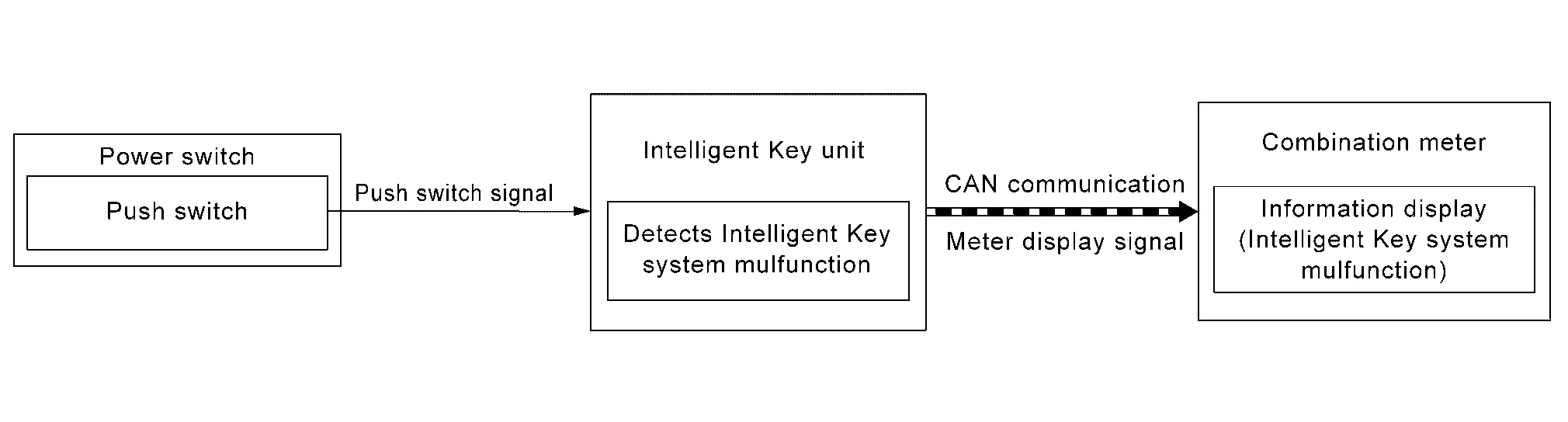
SIGNAL PATH
When Intelligent Key unit detects that Intelligent Key system malfunctions or that the engine cannot be started, meter display signal is transmitted by Intelligent Key unit to combination meter via CAN communication.
When combination meter receives meter display signal, Intelligent Key system malfunction displays.
When any of the following conditions are satisfied.
The vehicle cannot set READY.
Intelligent Key system malfunction is detected.
When any of the following conditions are satisfied.
Intelligent Key system malfunction or vehicle cannot set READY status is resolved.
Ignition switch is turned to OFF, and 15 seconds are passed.
TIMING CHART

Key ID Verification Information
DESIGN/PURPOSE
If the system cannot detect a registered Intelligent Key inside the vehicle, it informs the driver that it is necessary for the Nissan Ariya vehicle to detect a registered Intelligent Key.
| Symbol | Message |
|---|---|
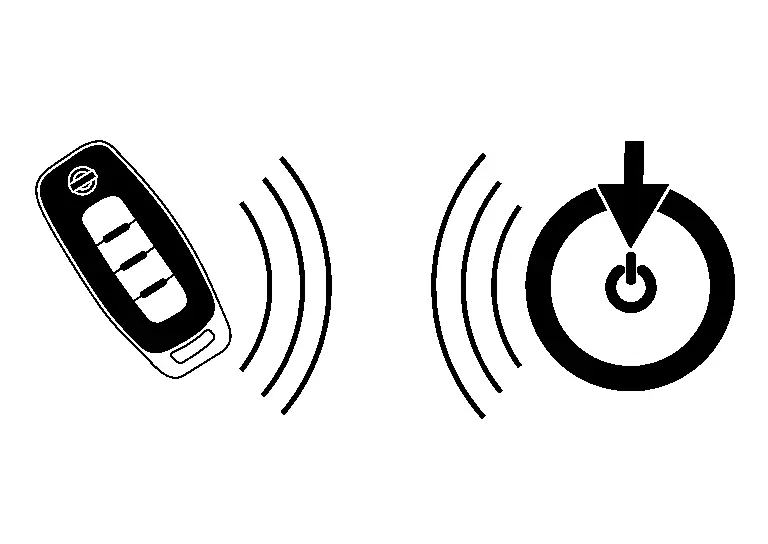 |
Place the key near the start switch |
SYNCHRONIZATION WITH MASTER WARNING LAMP
No applicable
SYSTEM DIAGRAM

SIGNAL PATH
Intelligent Key unit activates NATS antenna amp. and checks that Intelligent Key is in vehicle, when power switch operation is performed while power switch is OFF.
When Intelligent Key unit does not detect a registered Intelligent Key in Nissan Ariya vehicle, meter display signal is transmitted by Intelligent Key unit to combination meter via CAN communication.
When combination meter receives meter display signal, key ID verification information displays.
When all of the following conditions are satisfied.
Power switch is OFF.
Power switch operation is performed.
Registered Intelligent Key is not detected inside the Nissan Ariya vehicle.
When any of the following conditions are satisfied.
After 5 seconds are passed since the key ID verification information is displayed.
When Intelligent Key backside is contacted to power switch. And then turn power switch ON.
Registered Intelligent Key is detected inside the Nissan Ariya vehicle.
Take Away Warning (Information Display)
DESIGN/PURPOSE
Information display warns the driver that Intelligent Key is not detected in vehicle.
| Symbol | Message |
|---|---|
|
No Key Detected |
SYNCHRONIZATION WITH MASTER WARNING LAMP
Synchronization is applied.
Refer to Master Warning Lamp.
SYNCHRONIZATION WITH WARNING CHIME
Take away warning
Refer to Take Away Warning (Buzzer).
SYSTEM DIAGRAM
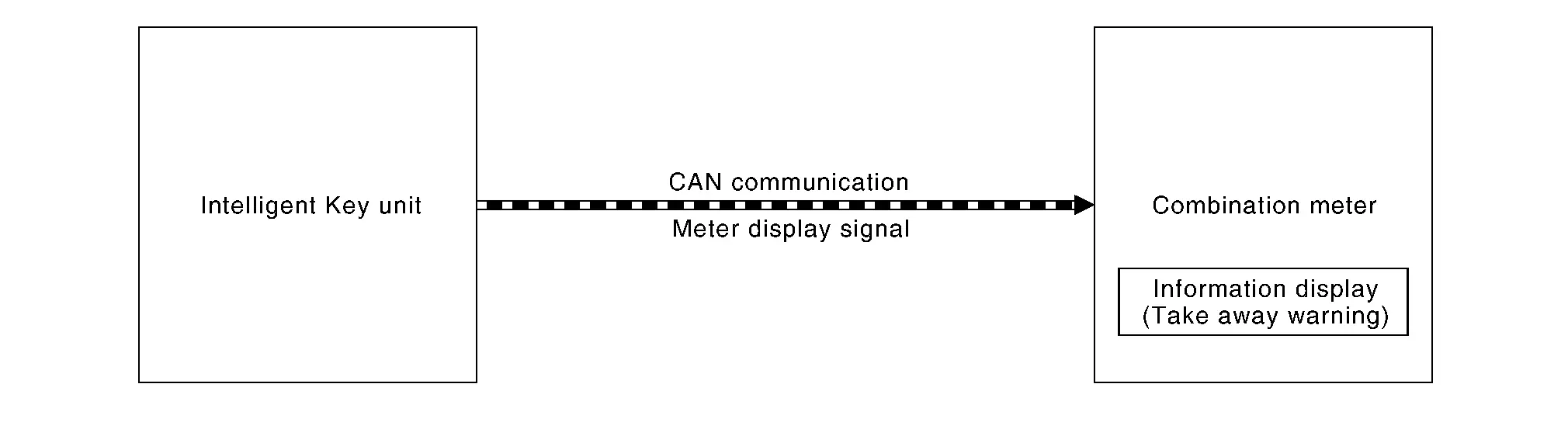
SIGNAL PATH
Intelligent Key unit transmits meter display signal to combination meter via CAN communication, when take away warning (buzzer) is operated.
When combination meter receives meter display signal, take away warning displays.
Take away warning (buzzer) operates.
Refer to Take Away Warning (Buzzer).
Take away warning (buzzer) is canceled.
Refer to Take Away Warning (Buzzer)
TIMING CHART

Warning/indicator/chime List Nissan Ariya: FE0
Warning Lamp/Indicator (Information Display)
| Item | Reference |
|---|---|
| Door open warning | Refer to Door Open Warning |
| READY set information | Refer to READY Set Information. |
| Intelligent Key low battery warning | Refer to Intelligent Key Low Battery Warning |
| Intelligent Key system malfunction | Refer to Intelligent Key System Malfunction. |
| Key ID verification information | Refer to Key ID Verification Information. |
| Take away warning | Refer to Take Away Warning (Information Display). |
Warning Chime
| Item | Reference |
|---|---|
| Door lock operation warning | Refer to Door Lock Operation Warning. |
| Take away warning (buzzer) | Refer to Take Away Warning (Buzzer). |