Transmitter Battery
- Removal
- Installation
Removal
REMOVAL
NOTICE:
Take extra care when handling these precision electronic components.
COMPONENTS (REMOVAL)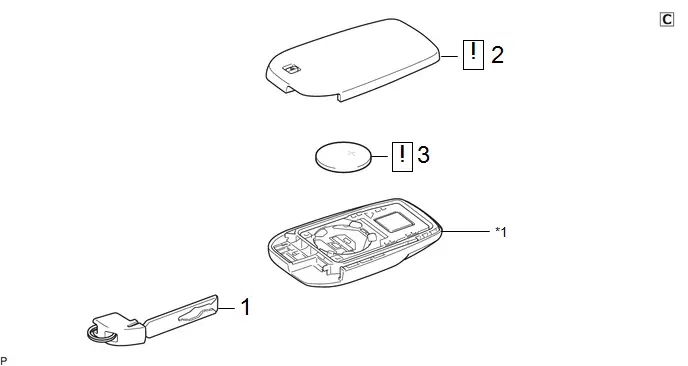
Procedure | Part Name Code |  |  |  |
|
|---|---|---|---|---|---|
1 |
CUT KEY |
69503B |
- |
- |
- |
2 |
TRANSMITTER BATTERY HOUSING COVER |
- |
 |
- |
- |
3 |
TRANSMITTER BATTERY |
89745A |
 |
- |
- |
*1 |
TRANSMITTER HOUSING CASE |
- |
- |
PROCEDURE
1. REMOVE CUT KEY

*a |
Release Hook Knob |
- |
- |
 |
Slide in this Direction |
 |
Remove in this Direction |
2. REMOVE TRANSMITTER BATTERY HOUSING COVER

(1) Insert a screwdriver with its tip wrapped in protective tape into the gap, and turn the screwdriver to remove the transmitter housing cover.
NOTICE:
Do not use excessive force when prying apart the transmitter housing cover.
3. REMOVE TRANSMITTER BATTERY

 |
Remove in this Direction |
- |
- |
(1) Insert a screwdriver with its tip wrapped in protective tape into the gap, and gently remove the transmitter battery (lithium battery: CR2450) as shown in the illustration.
NOTICE:
- Do not push the terminals with your finger.
- Do not forcibly pry up the transmitter battery (lithium battery: CR2450) as the terminals may be damaged.
- Do not touch the transmitter battery (lithium battery: CR2450) with wet hands. Moisture may cause rust.
- Do not touch or move any components inside the transmitter housing case. It may interfere with proper operation.
- When replacing the transmitter battery (lithium battery: CR2450), before starting work, remove static electricity that has built up in the body by touching, for example, the vehicle to prevent the electrical key transmitter sub-assembly from being damaged.
Installation
INSTALLATION
COMPONENTS (INSTALLATION)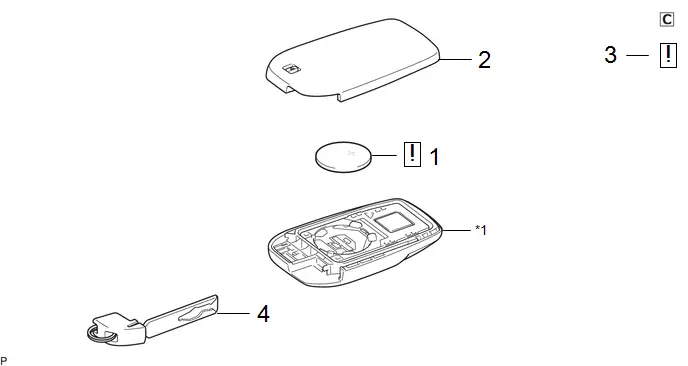
Procedure | Part Name Code |  |  |  |
|
|---|---|---|---|---|---|
1 |
TRANSMITTER BATTERY |
89745A |
 |
- |
- |
2 |
TRANSMITTER BATTERY HOUSING COVER |
- |
- |
- |
- |
3 |
INSPECT TRANSMITTER LED ILLUMINATION |
- |
 |
- |
- |
4 |
CUT KEY |
69503B |
- |
- |
- |
*1 |
TRANSMITTER HOUSING CASE |
- |
- |
PROCEDURE
1. INSTALL TRANSMITTER BATTERY

 |
Install in this Direction |
- |
- |
(1) Install the transmitter battery (lithium battery: CR2450) with the positive (+) side facing upward, as shown in the illustration.
NOTICE:
- Do not push the terminals with your finger.
- Do not forcibly pry up the transmitter battery (lithium battery: CR2450) as the terminals may be damaged.
- Do not touch the transmitter battery (lithium battery: CR2450) with wet hands. Moisture may cause rust.
- Do not touch or move any components inside the transmitter housing case. It may interfere with proper operation.
- When replacing the transmitter battery (lithium battery: CR2450), before starting work, remove static electricity that has built up in the body by touching, for example, the vehicle to prevent the electrical key transmitter sub-assembly from being damaged.
2. INSTALL TRANSMITTER BATTERY HOUSING COVER
3. INSPECT TRANSMITTER LED ILLUMINATION

*a |
LED |
- |
- |
(1) Press one of the transmitter switches and check that the LED illuminates.
OK:
Transmitter LED illuminates when a switch is pressed.
4. INSTALL CUT KEY