Diagnosis and repair workflow
Workflow
OVERALL SEQUENCE
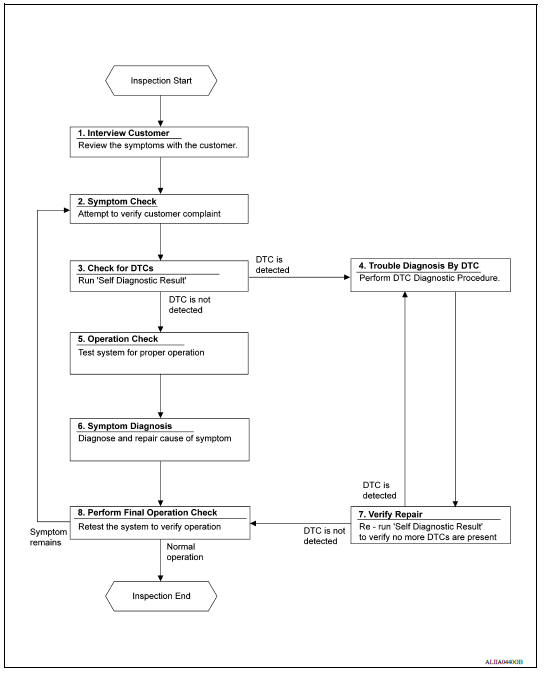
DETAILED FLOW
1.INTERVIEW CUSTOMER
Interview the customer to obtain as much information as possible about the conditions and environment under which the malfunction occurred.
>> GO TO 2.
2.SYMPTOM CHECK
Verify symptoms.
>> GO TO 3.
3.CHECK FOR DTCS
With CONSULT
- Turn ignition switch ON.
- Select "Self Diagnostic Result" mode of "BCM" using CONSULT.
- Check DTC.
Is any DTC detected?
YES >> GO TO 4.
NO >> GO TO 5.
4.PERFORM DTC DIAGNOSTIC PROCEDURE
Perform the diagnostic procedure for the detected DTC. Refer to BCS "DTC Inspection Priority Chart" or BCS "DTC Inspection Priority Chart".
>> GO TO 7.
5.OPERATION CHECK
Perform the operation check. Refer to HAC "Work Procedure".
>> GO TO 6.
6.SYMPTOM DIAGNOSIS
Check the symptom diagnosis table. Refer to HAC "Symptom Table".
>> GO TO 8.
7.VERIFY REPAIR.
With CONSULT
- Turn ignition switch ON.
- Select "Self Diagnostic Result" mode of "BCM" using CONSULT.
- Check DTC.
Is any DTC detected?
YES >> GO TO 4.
NO >> GO TO 8.
8.PERFORM FINAL OPERATION CHECK
Perform the operation check. Refer to HAC "Work Procedure".
Does it operate normally?
YES >> Inspection End.
NO >> GO TO 2.