EPS Control unit
In this manual: EPS Control unit
4steps
~24min
2/5difficulty
Done 0 of 4
Exploded View
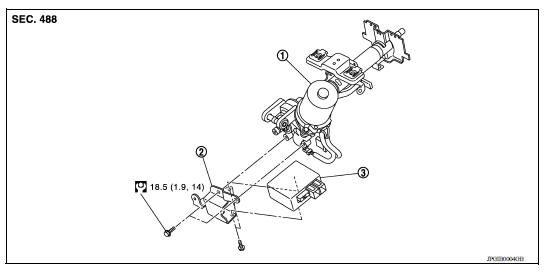
1. Steering column assembly 2. Bracket 3. EPS control unit
Removal and Installation
REMOVAL
- Perform a CPU memory erase on the EPS with CONSULT before removal.
CAUTION:
- Disconnect battery negative terminal before continuing.
- Do not shock EPS control unit, e.g. drop or hit.
- Do not get EPS control unit wet with water or other liquid. Also, do not give EPS control unit a radical temperature change to avoid getting water drops.
- Do not disassemble or remodel EPS control unit, EPS motor, torque sensor, harness and connectors.
- Remove instrument lower panel LH. Refer to IP "Removal and Installation".
- Disconnect harness connectors from EPS control unit.
CAUTION: Hold and pull the connector housing, do not pull on harness when disconnecting connectors.
Also, do not grip, collapse or apply excessive force to the connector.
- Remove EPS control unit from steering column assembly.
- Remove bracket from steering column assembly if necessary.
INSTALLATION
Installation is in the reverse order of removal.
- Check that harness is not damaged when installing EPS control unit. Also, check that EPS control unit is installed without trapping harness on foreign materials.
- After installing steering column assembly, perform self-diagnosis with CONSULT to ensure correct operation.
Was this page helpful?