Instrument lower panel LH
In this manual: Instrument lower panel LH
6steps
~36min
2/5difficulty
Done 0 of 6
Removal and Installation
REMOVAL
- Remove data link connector from instrument lower panel LH.
- Remove hood and fuel filler handle assembly bolts (A) and position hood and fuel filler handle assembly aside.
- Remove instrument lower panel LH. Refer to IP "Exploded View".

a. Release instrument lower panel LH by using a suitable tool to release the pawls and metal clips and pulling rearward.
CAUTION: Disengage pawls and metal clips slowly so that they are not damaged.
b. Disconnect harness connectors from instrument lower panel LH and remove.
INSTALLATION
Installation is in the reverse order of removal.
CLUSTER LID C
Removal and Installation
REMOVAL
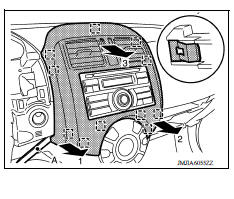
- Release the metal clips using a suitable tool (A), beginning in the lower left corner of cluster lid C and working in a counterclockwise direction.
- Reposition cluster lid C to access harness connectors.
- Disconnect harness connectors from cluster lid C and remove.
 : Metal clip
INSTALLATION
Installation is in the reverse order of removal.
Was this page helpful?