Intelligent key
Component Function Check
NOTE: The Signal Tech II Tool (J-50190) can be used to perform the following functions. Refer to the Signal Tech II User Guide for additional information.
- Check Intelligent Key relative signal strength.
- Confirm vehicle Intelligent Key antenna signal strength.
1.CHECK FUNCTION
- Select "INTELLIGENT KEY" of "BCM" using CONSULT.
- Select "RKE OPE COUN1" in "DATA MONITOR" mode.
- Check that the function operates normally according to the following conditions.

Is the inspection result normal? YES >> Intelligent Key is OK.
NO >> Refer to DLK-93, "Diagnosis Procedure".
Diagnosis Procedure
NOTE: The Signal Tech II Tool (J-50190) can be used to perform the following functions. Refer to the Signal Tech II User Guide for additional information.
- Check Intelligent Key relative signal strength.
- Confirm vehicle Intelligent Key antenna signal strength.
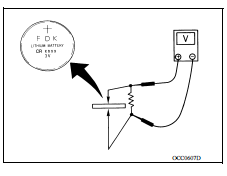
1.CHECK INTELLIGENT KEY BATTERY
Check by connecting a resistance (approximately 300Ω) so that the current value becomes about 10 mA. Refer to DLK "Removal and Installation".
Standard : Approx. 2.5 - 3.0V
Is the measurement value within the specification?
YES >> Replace Intelligent Key.
NO >> Replace Intelligent Key battery.