Auto High-Beam (High-Beam Support System) Description - Control/Function
In this manual: Auto High-Beam (High-Beam Support System) Description - Control/Function
~2min read
Operating Conditions
- The combination light switch is in the AUTO position.
- The headlight low beam turned on.
- White and red light sources are not detected ahead.
- 2 or more streetlights have not been detected.
- The vehicle speed is at 40 km/h or more.
- There is no halation state in front of the vehicle.
- There is no manual operation input of the combination light switch.
NOTE: Weather and road conditions (undulation, curve, or environment illuminance etc.) may affect system operation.
Stopping Condition
The system stops operation under the following conditions.
- If the front wiper motor operates at HIGH for 5 seconds.
- If the combination light switch is turned to other than the AUTO position.
- If the dimmer switch is operated.
Conditions that the System Switches to Low Beam
- When there are objects that are emitting lights such as streetlights, house lights, advertising display lighting, signages, vending machines, or other reflecting light.
- When there are objects emitting lights on the road similar to the taillights of vehicles driving ahead or headlights of oncoming vehicles.
- When the red lights of the traffic signals are detected.
Conditions that Switching Timing to Low Beam is Changed
- When the taillights of the vehicle driving ahead are bright or dark.
- When the headlights of the oncoming vehicle are bright or dark.
- In rainy, snowy, and foggy weather.
Detection Range and Limits
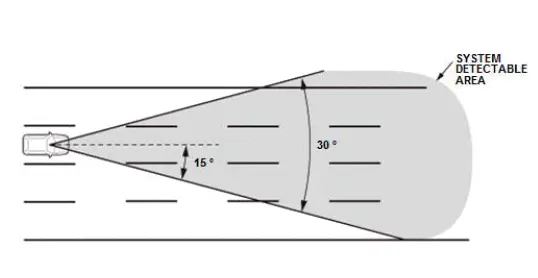
The auto high-beam camera recognizes and reacts within the range of 15 º horizontally (total 30 º).
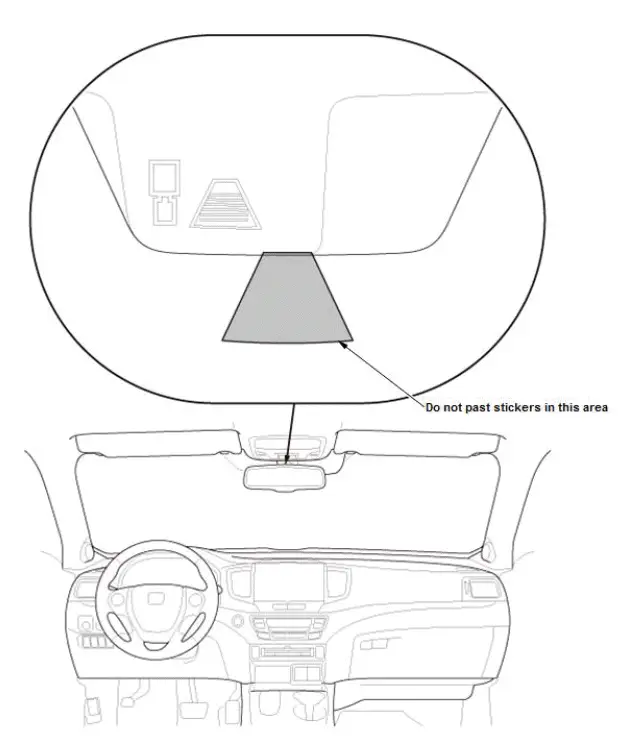
Sticker Pasting Prohibited range
Pasting sticker on the windshield in front of the camera may decrease the sensitivity of the camera and result in abnormal operation.
Auto High-Beam Operation Indicator
When the system malfunction occurs, or when the camera lens or the windshield gets dirty, the warning display is shown in the multi- information display (MID).
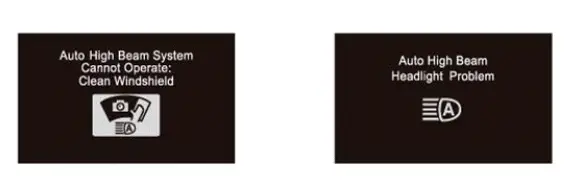
NOTE: The actual message may be different depending on your market.
Was this page helpful?