Console Box Light Removal and Installation
In this manual: Console Box Light Removal and Installation
5steps
~30min
2/5difficulty
Done 0 of 5
Removal/Installation
1. Console Box Light - Remove
Console Box Light: 1.4W
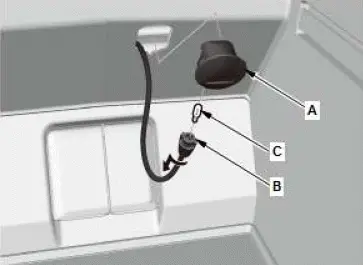
- Carefully pry off the lens (A).
- Turn the bulb socket (B) counterclockwise to remove the bulb (C).
2. All Removed Parts - Install
- Install the parts in the reverse order of removal.
Coolant Check
Check
1. Coolant - Check

- Check the coolant level in the coolant reservoir. Make sure it is between the MAX mark (A) and MIN mark (B).
- If the coolant level in the coolant reservoir is at or below the MIN mark, add coolant to bring it between the MIN and MAX marks, then inspect the cooling system for leaks.
- Check the coolant level in the radiator, and add Honda Long Life Antifreeze/Coolant Type 2 into the radiator up to the base of the filler neck, if needed.
NOTE:
- Always use Honda Long Life Antifreeze/Coolant Type 2. Using a non-Honda coolant can result in corrosion, causing the cooling system to malfunction or fail.
- Honda Long Life Antifreeze/Coolant Type 2 is a mixture of 50 % antifreeze and 50 % water. Do not add water.
Was this page helpful?