DVD Player Unit Removal and Installation
In this manual: DVD Player Unit Removal and Installation
3steps
~18min
2/5difficulty
Done 0 of 3
Removal/Installation
1. Dashboard Center Middle Trim - Remove
2. DVD Player Unit Assembly - Remove
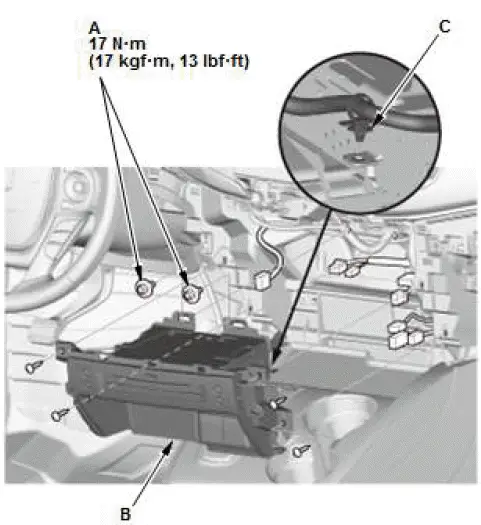
- Using a TORX E8 bit, remove the TORX bolts (A).
- Pull out the DVD player unit (B), then remove the harness clip (C).
- Disconnect the connectors, then remove the DVD player unit.
3. USB Adapter - Remove
4. Seat Heater Switch - Remove
5. Front Accessory Power Socket - Remove
6. Accessory Socket Panel - Remove
7. DVD Player Unit - Remove
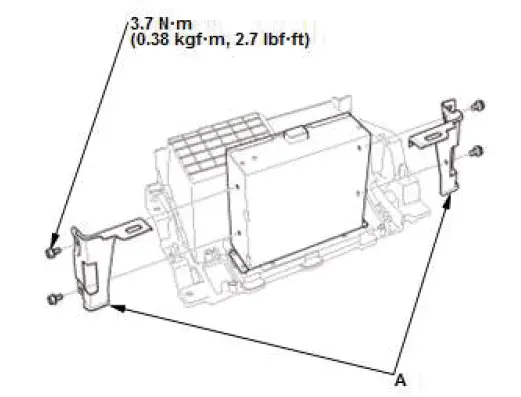
- Remove the brackets (A).
8. All Removed Parts - Install
- Install the parts in the reverse order of removal.
NOTE: If the bolt threads of the steering hanger beam are stripped, replace the bolts with one-size larger bolts (available as a service part), which are specifically designed to tighten the instrument panel to the specified torque setting.
ECON Switch Removal and Installation
Removal/Installation
1. Driver's Dashboard Lower Cover - Remove
2. ECON Switch - Remove
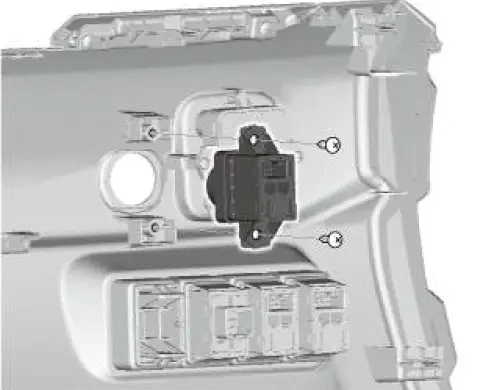
3. All Removed Parts - Install
- Install the parts in the reverse order of removal.
Was this page helpful?