Rear Controller and Screen Removal and Installation
In this manual: Rear Controller and Screen Removal and Installation
5steps
~30min
2/5difficulty
Done 0 of 5
Removal/Installation
NOTE:
- Put on gloves to protect your hands.
- Take care not to scratch the headliner and display cover.
1. Display Cover - Remove
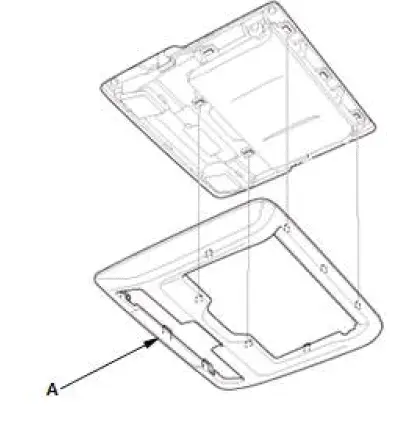
- Remove the wireless remote control, then remove the display cover (A).
2. Rear Controller and Screen - Remove
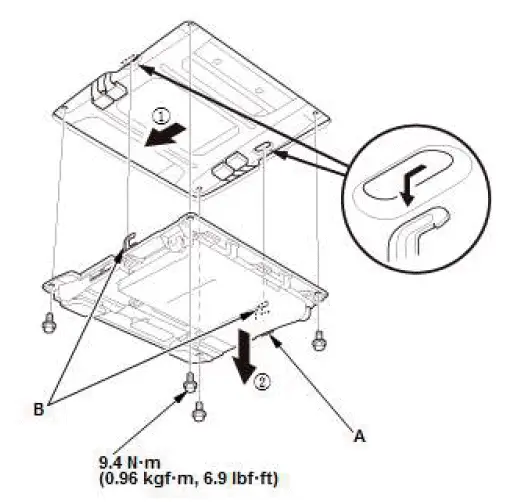
- Remove the bolts, and disconnect the connectors.
- Pull the rear controller and screen (A) forward, under the headliner to release the hooks (B), then pull the rear controller back and down to remove.
3. All Removed Parts - Install
Rear Corner Sensor Removal and Installation
Removal/Installation
1. Rear Corner Sensor - Remove
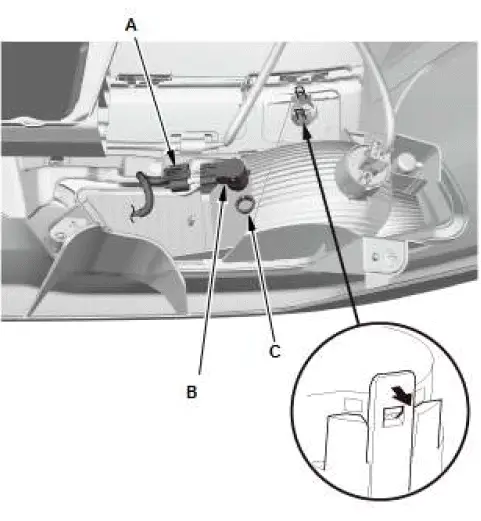
- Disconnect the connector (A).
- Remove the rear corner sensor (B).
- Remove the ring (C).
2. All Removed Parts - Install
- Install the parts in the reverse order of removal.
Was this page helpful?