BSI Alert Indicator Removal and Installation
In this manual: BSI Alert Indicator Removal and Installation
2steps
~12min
1/5difficulty
Done 0 of 2
Removal/Installation
1. Front Door Panel - Remove
2. Mirror Mount Cover - Remove
3. BSI Alert Indicator - Remove
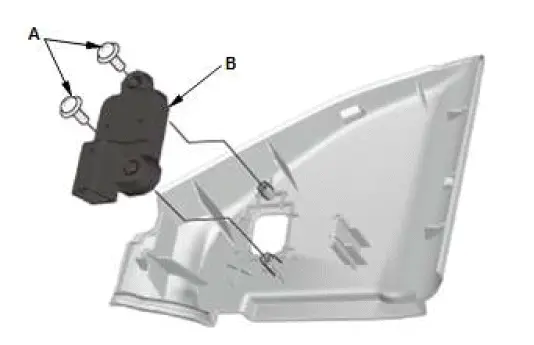
- Remove the screws (A), then remove the BSI alert indicator (B).
4. All Removed Parts - Install
- Install the parts in the reverse order of removal.
BSI Radar Unit Mounting Area Check
Adjustment
1. BSI Radar Unit - Remove
2. Upper Body Measuring Dimensions - BSI Radar Unit Mounting Positions
- Install bolts on each hole of the body panel.
- Measure the length from the tip of the bolt installed to each hole A, B, and C to the body center line.
NOTE: If measured lengths between a body center line and hole A to C are different from the standard, take the vehicle to a body repair shop to have the panel adjusted to standard.

3. BSI Radar Unit - Install
4. Rear Bumper - Install
Special Tool Required

- Target Set 07AAJ-STKA160
Was this page helpful?