Combination Light Switch Removal, Installation, and Test
In this manual: Combination Light Switch Removal, Installation, and Test
2steps
~12min
1/5difficulty
Done 0 of 2
Removal/Installation
SRS components are located in this area. Review the SRS component locations and the precautions and procedures before doing repairs or service.
1. Column Covers - Remove
2. Combination Light Switch - Remove
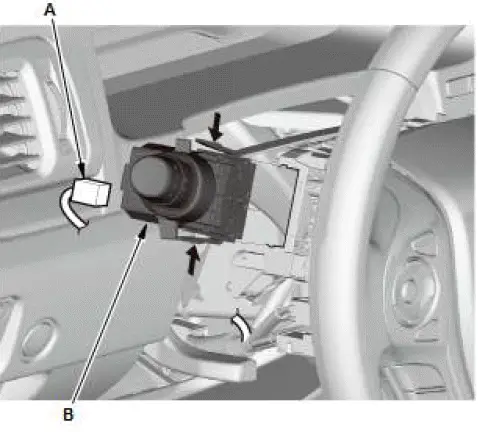
- Disconnect the connector (A).
- Remove the combination light switch (B) by pressing the tabs.
3. All Removed Parts - Install
- Install the parts in the reverse order of removal.
Test
1. Combination Light Switch - Test
- Inspect the connector terminals to be sure they are all making good contact.
- If the terminals are bent, loose or corroded, repair them as necessary, and recheck the system.
- If the terminals are OK, go to step 2.
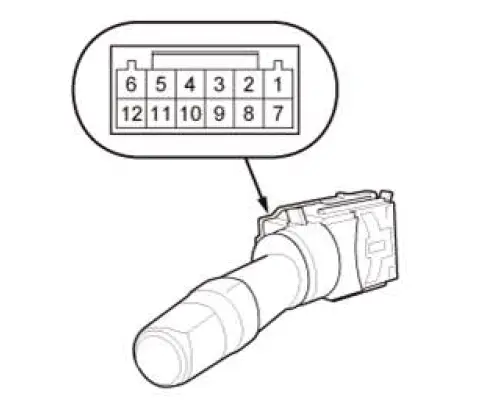
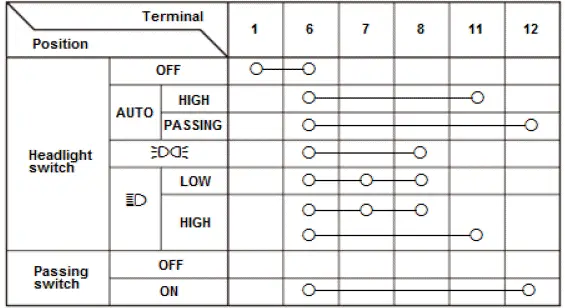
- Check for continuity between the terminals in each switch position according to the tables.
Light Switch
Turn Signal Switch
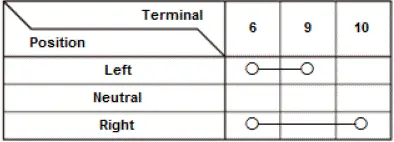
Fog Light Switch
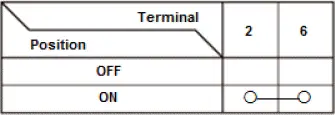
- If the continuity is not as specified, replace the combination light switch.
Was this page helpful?