RDM Switch Removal, Installation, and Test
Removal/Installation
1. Driver's Dashboard Lower Cover - Remove
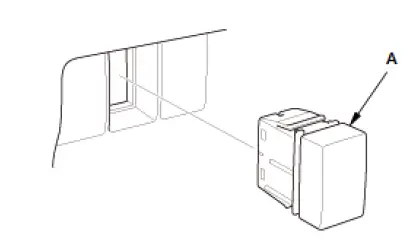
2. RDM OFF Switch - Remove
NOTE: The mounting position of the RDM OFF switch (A) is different on the model.
3. All Removed Parts - Install
- Install the parts in the reverse order of removal.
Test
1. RDM OFF Switch - Test
RDM OFF Switch Internal Resistance Check:
- Measure the resistance between RDM OFF switch 5P connector terminals No. 2 and No. 5 according to the table.
If there is no resistance in one or more positions, replace the RDM OFF switch.

RDM OFF Switch Indicator Drive Circuit Check:
- Check the LED for illumination by applying power and ground to the terminals according to the table.
NOTE: Important operating characteristic; diode bias cause a diode to fully conduct electricity in one direction (forward), while not at all in the opposite direction (reverse).
If the results are not as specified, replace the RDM OFF switch.
RDM OFF Switch Illumination Circuit Check:
- Check the LED for illumination by applying power and ground to the terminals according to the table.
NOTE: Important operating characteristic; diode bias cause a diode to fully conduct electricity in one direction (forward), while not at all in the opposite direction (reverse).
If the results are not as specified, replace the RDM OFF switch.