CMBS OFF Switch Removal, Installation, and Test
In this manual: CMBS OFF Switch Removal, Installation, and Test
3steps
~18min
2/5difficulty
Done 0 of 3
Removal/Installation
1. Driver's Dashboard Lower Cover - Remove
2. CMBS OFF Switch - Remove

NOTE: The mounting position of the RDM OFF switch (A) is different on the model.
3. All Removed Parts - Install
- Install the parts in the reverse order of removal.
Test
1. CMBS OFF Switch - Test
- On the switch side, check for continuity between the connector terminal in each switch position according to the table.
- If the switch does not work as described in the table, replace the switch.
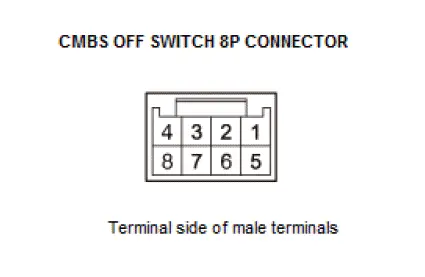
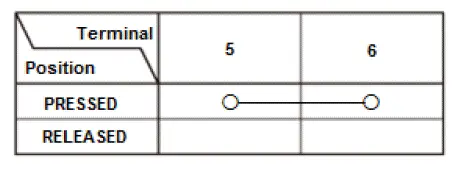
- Check the LED for illumination by applying power and ground to the terminals according to the table.
NOTE: Important operating characteristic; diode bias cause a diode to fully conduct electricity in one direction (forward), while not at all in the opposite direction (reverse).
If the results are not as specified, replace the CMBS OFF switch.

CMP Sensor Removal and Installation
Removal/Installation
1. Front Camshaft Pulley (CMP Sensor Pulse Plate) and Back Cover - Remove
2. CMP Sensor - Remove
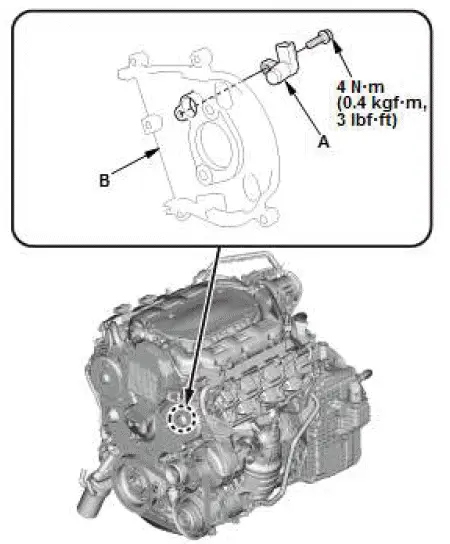
- Remove the CMP sensor (A) from the back cover (B).
3. All Removed Parts - Install
- Install the parts in the reverse order of removal.
4. CKP Pattern - Clear/Learn
Was this page helpful?