ECON Switch Test
In this manual: ECON Switch Test
~1min read
Test
1. Driver's Dashboard Lower Cover - Remove
2. ECON Switch - Test

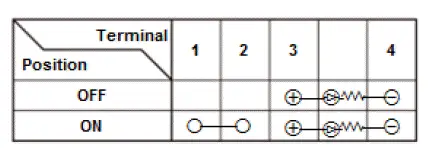
- Check for continuity between the terminals in each switch position according to the table.
NOTE:
- Make sure the correct test lead (+or -) is placed on the terminal.
- When checking for continuity across the diode, use the diode setting (
 ) on the digital volt/ohm meter to check the diode bias.
- Note this important operating characteristic; diode bias causes a diode to fully conduct electricity in one direction (forward), while not at all in the opposite direction (reverse).
- If the continuity is not as specified, replace the ECON switch (A).
3. All Removed Parts - Install
- Install the parts in the reverse order of removal.
Was this page helpful?