Idle Stop Off Switch Removal, Installation, and Test
In this manual: Idle Stop Off Switch Removal, Installation, and Test
~1min read
Removal/Installation
1. Center Console Panel - Remove
2. Idle Stop Off Switch - Remove

3. All Removed Parts - Install
- Install the parts in the reverse order of removal.
Test
1. Center Console Panel - Remove
2. Idle Stop Off Switch - Test
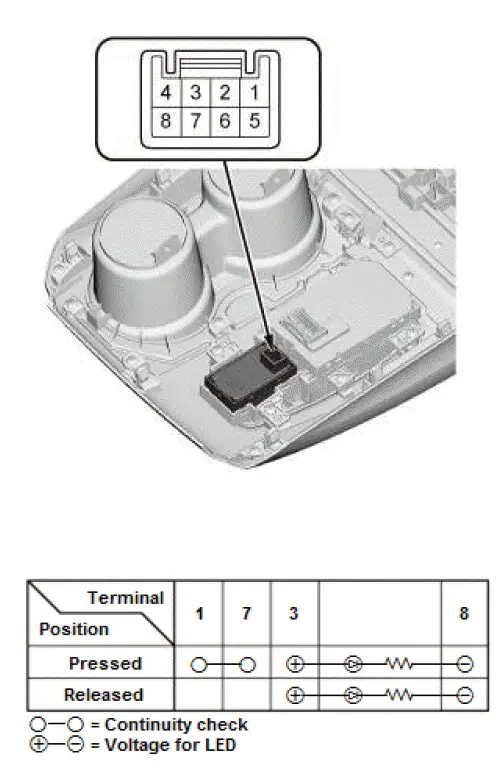
- Check the idle stop off switch according to the table.
NOTE:
- When an LED is located between terminals, check if the LED illuminates by connecting power and ground to the LED.
- Note this important operating characteristic; diode bias causes a diode to fully conduct electricity in one direction (forward), while not at all in the opposite direction (reverse).
- If the switch does not work as described in the table, replace the switch.
Was this page helpful?